

Splicer guides · 01
Get started
Splicer, by PITO MD, cuts talking videos by what you said. This guide gets it onto your machine and ready for your first recording, which takes less time than reading about it. Apart from updates, nothing downloads after the install, so the hard part is picking which video to cut first.
Pick your download
Three builds, one per platform, all at pitomd.com/splicer.
On a Mac you get Splicer-<version>.dmg, for macOS 13.3 or later on Apple Silicon only. Drag Splicer into Applications. It’s signed and notarized, so the Mac opens it without a word.
On Windows x86_64 you get Splicer-<version>-Setup.exe. The installer is not code-signed, so Windows may say “Windows protected your PC”. Click More info, then Run anyway. I know.
On Linux x86_64 you get Splicer-<version>-linux-x86_64.run. Run it with sh:
sh Splicer-<version>-linux-x86_64.runIt installs to ~/.local/opt/splicer, links splicer into ~/.local/bin, adds the app menu entry and opens .splice files from then on.
Use Splicer from the terminal
Every splicer command works from a terminal once splicer is on your PATH.
On a Mac, the first time Splicer opens from Applications it offers to install the splicer command for Terminal. Say yes and type your Mac’s password. If you said no, open More and choose “Install the splicer command for Terminal”, or run this in Terminal:
/Applications/Splicer.app/Contents/MacOS/splicer command installThe same row takes the command away again. By hand, either link it:
sudo mkdir -p /usr/local/bin
sudo ln -sf /Applications/Splicer.app/Contents/MacOS/splicer /usr/local/bin/splicer
or add this line to ~/.zshrc and open a new Terminal window:
export PATH="/Applications/Splicer.app/Contents/MacOS:$PATH"On Windows, the installer adds Splicer’s folder to your PATH. To do it by hand, open Start, type “environment variables”, choose “Edit environment variables for your account”, pick Path, choose Edit, then New, and add C:\Program Files\Splicer. Or run this once in PowerShell, which adds it to your own PATH only:
[Environment]::SetEnvironmentVariable("Path", [Environment]::GetEnvironmentVariable("Path", "User") + ";C:\Program Files\Splicer", "User")Open a new terminal window afterwards. Skip setx PATH "%PATH%;…": it copies the whole system PATH into yours and cuts anything past 1024 characters.
On Linux there’s nothing to do. The installer links splicer into ~/.local/bin, which most systems put on your PATH.
What’s inside, and what isn’t
The speech engine and its model ship inside the app. Nothing else downloads after that, only updates. You open a file and Splicer starts hearing it, in English and Spanish.
It opens MP4, MOV, M4V, MKV and WebM by itself, with H.264, HEVC or VP9 video and AAC, AC3, E-AC3, MP3, Opus or PCM sound inside.
Thirty days of everything
Splicer is free to try for thirty days with everything on. After that it stays free, with two limits and only two: an export stops at 5 minutes, and it carries a small Splicer wordmark.
Pro lifts the 5-minute limit and lets you turn the mark off. It’s $19.99, or EUR 19.99, paid once, good on 2 devices, and it covers every future release. Once. Not every month.
Enter your key
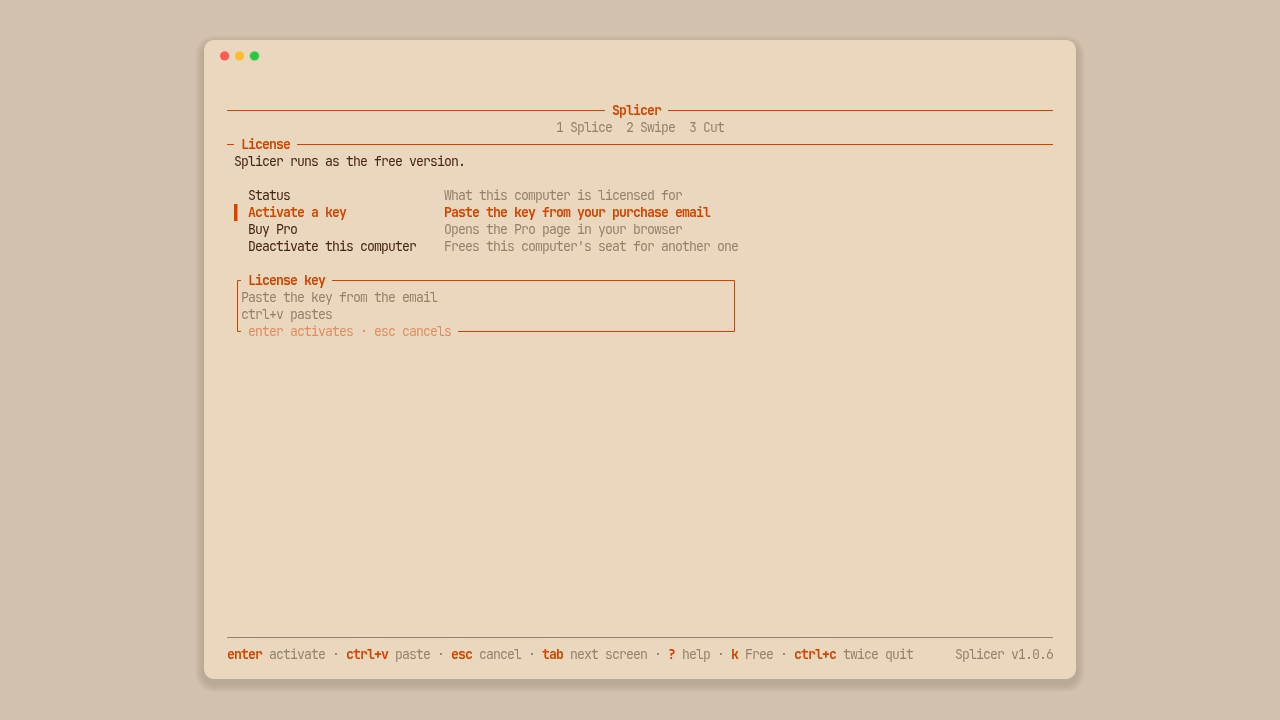
Your key arrives by email. On the desk, click the badge on the nameplate. It reads “Pro trial: N days left” while you’re trying it, or Free after that. You can also open More. Paste the key with Ctrl+V, or Cmd+V on a Mac, and press Enter. The badge now reads Pro.

In a terminal, the same thing in one line:
splicer license --activateThen paste the key. Or press k inside splicer tui and paste it on the key screen.
Stay current
Splicer checks for updates on its own and installs the ones signed by PITO MD. When you don’t feel like waiting, press u on the desk’s More page, choose the Check for updates row on the terminal’s Splice screen and press Enter, or run:
splicer updateThat’s the install. Now find a recording with you talking in it, and cut it.
The footage in this guide is NASA's holiday message from the International Space Station's Expedition 64 crew and NASA's Summer Solstice interview with Alex Young, both public domain.