
pito-codecs
Video and audio codecs in pure Rust, on the CPU and the GPU, with no ffmpeg inside. H.264, H.265, VP9, AV1 decode, AAC, AC-3, E-AC-3, Opus and MP3; MP4, MOV, MKV and WebM; GIF and WebP. One Cargo package, a feature per part, two direct dependencies and no C linked.
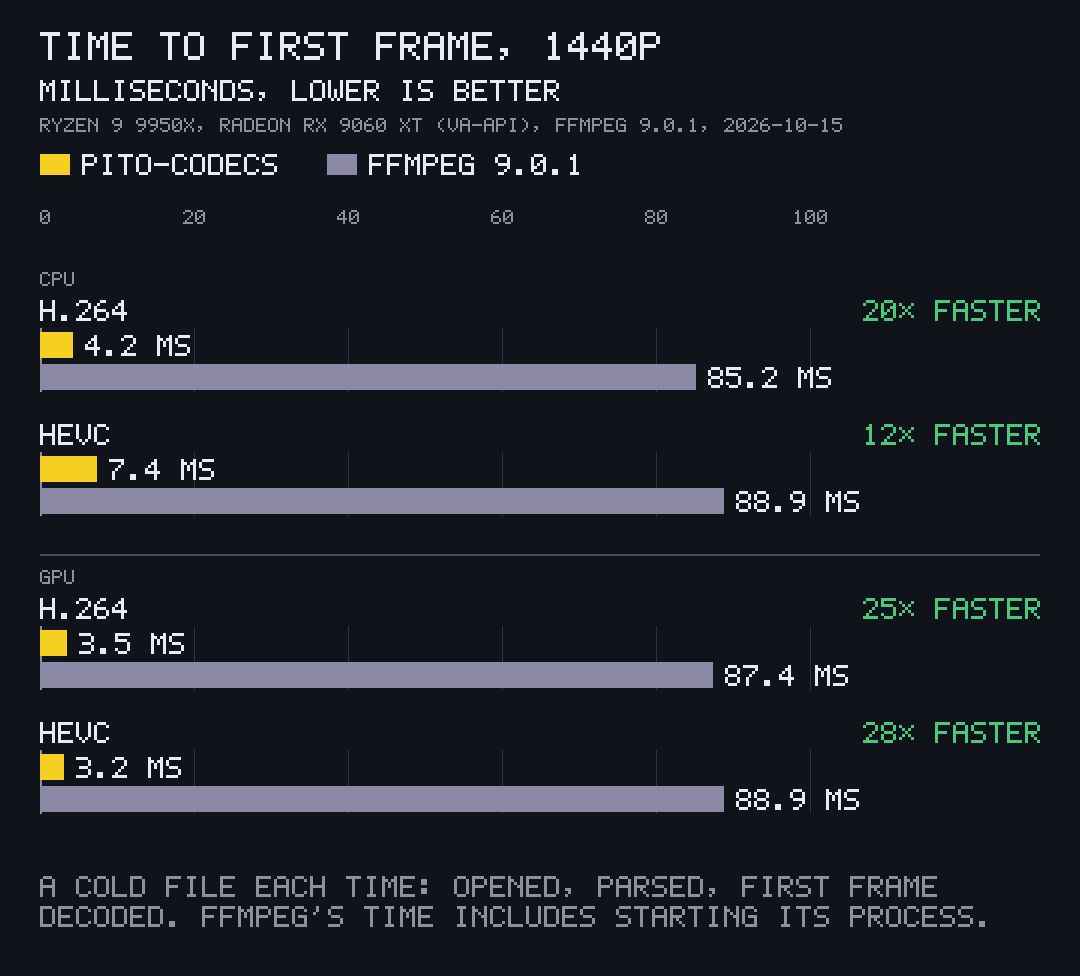
First frame 12× to 28× faster than ffmpeg Time to the first frame of a 1440p file: 4.2 ms against 85.2 ms for H.264 on the CPU, 3.2 ms against 88.9 ms for HEVC on the GPU. ffmpeg's time includes starting its process, which is what an app calling it pays. Measured 2026-10-15, as pito-codecs v1.16.3's README states.
-
An instant first frame
4.2 ms to the first frame of a 1440p H.264 file on the CPU, where ffmpeg takes 85.2 ms, a time that includes starting its process.
More on First frame -

Filmstrips that keep up
Stills at any time from MP4, MOV, MKV and WebM, handed over as each one is decoded.
More on Filmstrips -

Frame-accurate smart cuts
Frame-accurate exports that encode only the frames around each cut, with overlays blended on the card.
More on Smart cuts
- 12×–28× sooner first frame than ffmpeg, 1440p H.264 and HEVC
- 9×–11× faster filmstrips: 12 stills at 240 px, ffmpeg running 12 processes
- 1.7×–2.0× faster frame-accurate smart cuts than an ffmpeg re-encode
- 18×–23× less CPU time for a marked or captioned export, on the card
- 5.7 MB pcod, the command line; the library pulls in 8 crates on Linux
Video in your app, no ffmpeg in your app
Open it, show it, seek it, cut it, export it: inside your own process, on the GPU when there is one.
What it's for
- Opening, showing, seeking and cutting video inside your own app, with no ffmpeg process to start and no C library to link.
- Filmstrips and thumbnails that arrive while the user is still looking: stills at any time from MP4, MOV, MKV and WebM, reading only what each one needs.
- Frame-accurate exports that copy the middle of each piece and re-encode only around each cut, with your own audio mixed in.
- Converting with pcod: web MP4s, transparent WebMs, README GIFs and WebPs, contact sheets and loudness for upload, in one short command.
Who it's for
- Rust developers building editors, players, media browsers, thumbnailers and capture tools.
- Anyone shipping one self-contained binary: libva is loaded at run time on Linux, VideoToolbox is part of macOS and Media Foundation part of Windows, and without them everything runs on the CPU.
- Scripts that call a converter: pcod takes the command line of pconv, the ffmpeg-based converter it replaced, so a script moves over by changing the binary's name.
The front tries the GPU first and pito-codecs' own CPU code second, for every decode and every encode, and every fallback says why in a plain reason an app can show.
Use it
pcod, the command line over the library, comes with every GitHub Release for Linux x86-64, Windows x86-64 and macOS on Apple Silicon. These lines fetch the latest release.
v=$(curl -fsSLI -o /dev/null -w '%{url_effective}' https://github.com/gmrdad82/pito-codecs/releases/latest); v=${v##*/}
curl -fsSLO "https://github.com/gmrdad82/pito-codecs/releases/download/$v/pcod-$v-linux-x86_64.tar.gz"
tar -xzf "pcod-$v-linux-x86_64.tar.gz" pcod && install -Dm755 pcod ~/.local/bin/pcodv=$(curl -fsSLI -o /dev/null -w '%{url_effective}' https://github.com/gmrdad82/pito-codecs/releases/latest); v=${v##*/}
curl -fsSLO "https://github.com/gmrdad82/pito-codecs/releases/download/$v/pcod-$v-macos-arm64.tar.gz"
tar -xzf "pcod-$v-macos-arm64.tar.gz" pcod && sudo install -m755 pcod /usr/local/bin/pcod$v = (Invoke-RestMethod https://api.github.com/repos/gmrdad82/pito-codecs/releases/latest).tag_name
Invoke-WebRequest "https://github.com/gmrdad82/pito-codecs/releases/download/$v/pcod-$v-windows-x86_64.zip" -OutFile pcod.zip
Expand-Archive pcod.zip "$env:LOCALAPPDATA\pcod" -Force; [Environment]::SetEnvironmentVariable("Path", [Environment]::GetEnvironmentVariable("Path", "User") + ";$env:LOCALAPPDATA\pcod", "User")
SHA256SUMS in each Release lists every archive's checksum. To build
pcod from source anywhere, Linux arm64 included, with Rust 1.97 or newer: cargo install --locked --git https://github.com/gmrdad82/pito-codecs
--tag v1.16.3 pito-codecs --bin pcod.
Then, on any MP4 or a folder of PNG frames
pcod clip.mov web.mp4 --profile best
pcod probe clip.mp4
pcod decode clip.mp4 --route gpu
pcod encode clip.mp4 out.mp4 --codec hevc --route gpu
pcod frames frames/ trailer.mp4 --fps 60 --audio trailer.wav
pcod stills clip.mp4 --count 24 --cols 6 --sheet sheet.png --out stills/
In a Rust project
[dependencies]
pito-codecs = { git = "https://github.com/gmrdad82/pito-codecs", tag = "v1.16.3", default-features = false, features = ["h264", "hevc", "vp9", "aac", "mp4", "mkv", "gpu", "filter", "opus", "ac3", "mp3"] }use pito_codecs::media::{Prefs, first_frame, probe};
let prefs = Prefs::default();
let info = probe("clip.mp4".as_ref(), &prefs)?;
let still = first_frame("clip.mp4".as_ref(), 240, &prefs)?;
println!("{}x{} at {}/{} fps, first frame {}x{}", info.width, info.height, info.fps.0, info.fps.1, still.width, still.height);
All parts are on by default. For audio alone,
features = ["audio", "opus", "ac3", "mp3"] builds the probe and
the audio readers with no video decoder, GPU code or filters. On Windows, H.265
decode through Media Foundation needs Microsoft's HEVC Video Extensions.
What's inside
About 134,000 lines of Rust in one package, every parser and decoder with a cargo-fuzz target, malformed files returning errors instead of panicking.
-
01
Convert with one command
pcod <input> <output>converts a video, or a folder of PNG frames, into whatever the output's extension names, and needs no ffmpeg: MP4, MOV and MKV get H.264 and AAC, WebM gets VP9 and Opus with alpha when the source has it, GIF and WebP loop forever, and WAV takes the audio alone.Every video comes out limited-range BT.709 and tagged so, with rotation and non-square pixels applied; resizing is Lanczos in linear light.
pcod joinstitches clips by stream copy when they match and re-encodes them when they don't, saying which and why.pcod pcod master.mov site.mp4 --profile best --crf 23 # a light H.264 for the web pcod frames/ hero.webm --fps 60 # RGBA frames to a transparent WebM pcod clip.mp4 readme.gif --size 640 # a looping README GIF pcod join intro.mp4 scene.mp4 outro.mp4 film.mp4 # copied when the clips match pcod talk.mp4 upload.mp4 --loudness youtube # -14 LUFS in two EBU R128 passes, video copied pcod phone.mp4 engine.wav --from 0:12 --to 0:20 # a range of the audio as 16-bit PCM WAV pcod mix.wav master.wav --loudness -14 --linear # -14 LUFS keeping the dynamics, peaks limited pcod loudness master.mp4 --json # EBU R128 integrated, range, true peak, maximapcod probing a 1080p H.264 clip, decoding it on the CPU and through VA-API, then encoding it to HEVC on the GPU. Recorded by prec. -
02
An instant first frame
Opening a file and showing its first picture takes 4.2 ms for 1440p H.264 on the CPU and 3.2 ms for HEVC on the GPU.
An MKV or WebM file opens from its headers and Cues alone, so its size doesn't matter: on a gigabit network share, a 4.4 GB, 71-minute 720p H.264 MKV showed its first frame in 110 ms at the start and 193 ms at 35 minutes, reading 6.3 MB each time.
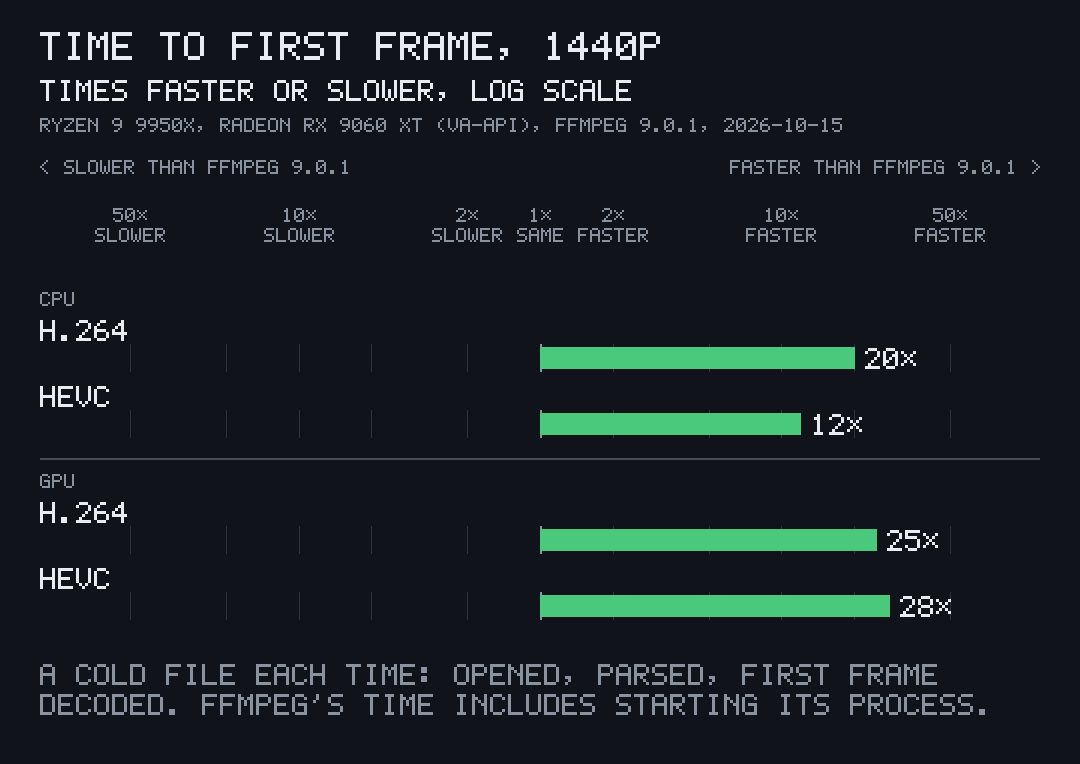
First frame, times sooner than ffmpeg 1440p, a cold file each time; ffmpeg's time includes starting its process. -
03
Filmstrips that keep up
frames_attakes stills at any times and reads only what it needs. A keptStillshandle reuses its decoders and hands each still over as soon as it is decoded: a 24-still filmstrip at 90 px of a 120 s 1080p file in 10.8 ms instead of 22.5 ms through separate calls.pcod stillswrites a 24-still contact sheet of a 10-minute 1080p file in 0.54 to 0.62 s on the GPU route, where ffmpeg's filter chain took 5.2 to 6.6 s.Made from twelve stills taken by frames_at(a GIF pito-codecs' own encoder wrote in 27 ms). -
04
Frame-accurate smart cuts
exportandexport_with_audiowrite an edit from pieces of one or more files. They copy the middle of each piece and re-encode only the frames around each cut, so the result is frame-accurate and 1.7× to 2.0× faster than ffmpeg re-encoding every frame.When two cut edges fall in one GOP, as they do when silences are cut out, they share one decode: 46 pieces with the gaps removed went from 9.6 s to 6.4 s on the card, every frame identical. VP9 sources cut the same way into MP4.
Export with audio you mixed yourself let done = export_with_audio("edit.mp4".as_ref(), &pieces, ExportOptions::default(), |piece, samples| mixer.render(piece, samples), |_| true)?; -
05
Overlays composed on the card
A watermark, or karaoke captions that change at every word, drawn on every frame of an export. On VA-API with Mesa's driver the overlay is blended by a video-processing pass straight into the encoder's input: no copy to system memory, and the overlay uploaded only when it changes, and only its painted area.
On the CPU, a caption change costs what its painted area costs: 0.5 to 0.9 ms at 1080p and 1.7 to 2.3 ms at 4K.
A caption and a corner mark drawn as one RGBA layer and blended by media::Blenderin 1.8 ms at 1280x720. -
06
Every format a cut needs
AV1 decodes on the card through VA-API and on the processor through a port of rav1d, every frame of the test streams bit-exact with dav1d. AC-3 and E-AC-3 come from a port of oxideav-ac3, MP3 from minimp3, and GIF and WebP read and write stills and animations.
Not covered: DTS, FLAC, Vorbis, ALAC, AV1 encode, ProRes, DNxHD, MPEG-2 and VP8 video, and subtitle tracks.
Part Decode Encode H.264 CPU and GPU, bit-exact with ffmpeg CPU with CABAC and B-frames; GPU through VA-API, VideoToolbox, NVENC H.265 Main and Main 10, CPU and GPU, bit-exact with ffmpeg GPU: VA-API, VideoToolbox, NVENC VP9 Profiles 0 to 3 on the CPU, 8 and 10-bit on VA-API, bit-exact CPU, profile 0 AV1 CPU (a port of rav1d) and GPU, bit-exact with dav1d — AAC AAC-LC, mono to 7.1 AAC-LC, CBR and VBR Opus SILK, CELT, hybrid and multistream CELT, 6 to 510 kbps AC-3, E-AC-3, MP3, MP2, MP1 Decode — MP4, MOV, MKV, WebM Tracks, seeking, edit lists, Cues, fragmented files Faststart or fragmented MP4 and MOV; MKV and WebM; remux GIF, WebP, PNG, WAV Stills and animations; WebP bit-exact with libwebp GIF and WebP, stills and animations
Every GPU route, honestly labelled
| Route | System | Decode | Encode | Tested on |
|---|---|---|---|---|
| VA-API, AMD (Mesa radeonsi) | Linux | H.264, H.265, VP9, AV1 | H.264, H.265; overlays composed on the card | AMD Radeon RX 9060 XT (RDNA 4), before every release |
| VA-API, Intel (iHD) | Linux | H.264, H.265, VP9, AV1 | H.264, H.265 | Built, untested on Intel hardware |
| VideoToolbox | macOS | H.264, H.265, AV1 | H.264, H.265 | GitHub's Apple Silicon runners on every push: decode bit-exact with ffmpeg, encodes decoded back; AV1 (Apple M3 and later) built, untested |
| NVENC | Linux, Windows | — | H.264, H.265 | Built and unit-tested, untested on NVIDIA hardware |
| Media Foundation | Windows | H.264, H.265, AV1 | — | Built and unit-tested, untested on GPU hardware |
The CPU codecs run and are tested on every push on Linux x86-64 and arm64, Windows x86-64 and macOS on Apple Silicon, with AVX2 kernels on x86-64 and NEON or portable paths on arm64.
Where PITO MD runs it
Not a demo: the media layer of PITO MD's own apps and tools.
-
 Splicer
Opens, plays, cuts and exports
Splicer, PITO MD's desk for cutting talking-head videos from their transcripts, opens, plays, cuts and exports through pito-codecs: it reads MKV, MP4 and MOV with H.264, HEVC, VP9, AAC, Opus and PCM itself.
See Splicer -
prec
Every terminal master
prec encodes its H.264 masters with pito-codecs' encoder, built into its own binary, with no ffmpeg.
See prec -
This page
Every loop you just watched
Each clip on this page is the README's GIF, encoded to a web H.264 loop by pcod.
Read it. Run it. It's MIT.
The code is MIT licensed, © Catalin Ilinca: read it, fork it, ship it in your own work. The PITO MD name and its logos are © Catalin Ilinca, all rights reserved, and are not covered by the MIT licence.
Issues are welcome on GitHub: a file that decodes wrong or slowly, with a small sample where you can share one, a route that falls back when it shouldn't, or a format you need. Pull requests aren't taken.
Credits
The clips come from pito-codecs v1.16.3: the GIF, the filmstrip and the overlay are pictures its examples/readme_shots.rs makes with its own decoders, overlay blend and GIF encoder from public-domain NASA footage ("A Message of Resilience from the International Space Station", NASA Johnson); the terminal clip was recorded by prec from pito-codecs' own shot. The charts are drawn by pito-compare from pito-codecs' data files and from numbers its README states.
pito-codecs adapts parts of FilmCraft (MIT), libwebp (BSD-3-Clause), oxideav-ac3 (MIT) and minimp3 (CC0), and ports rav1d and cros-codecs; the origins are in its INSPIRATION.md and their notices in its NOTICE.
Set in Archivo by Omnibus-Type and Atkinson Hyperlegible Mono by the Braille Institute, both under the SIL Open Font License.