
pito-tui
The app shell for PITO MD terminal apps, as one ratatui 0.30 crate. Give it a name, a version and an accent colour, plug in your screens, and the shell does everything around them: the terminal, a 120 fps loop, the keys, the header, the footer, the hourglass while a screen loads, modals, toasts, a live activity band, a log viewer, and headless dumps for tests and reviews.
0.07 to 0.31 ms to draw a whole frame Header, screen and footer, against the 8.3 ms a frame gets at 120 fps: the mean of 1,000 draws of each demo screen at 120x34 and 200x60 cells, release build of pito-tui 0.4.1 (1.0.0 draws with the same code), AMD Ryzen 9 9950X on Linux, 2026-10-14. Not measured on macOS or Windows.
-
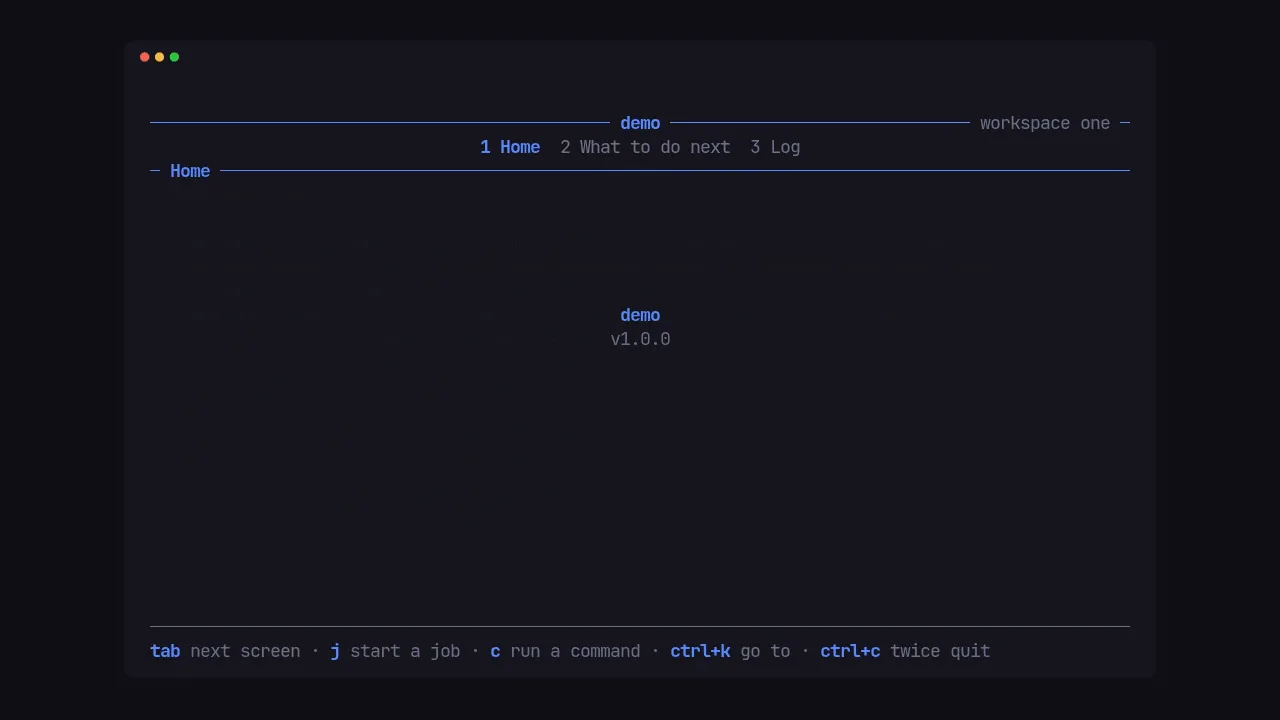
One crate for the shell
Give it a name, a version and an accent colour, plug in your screens, and the shell does everything around them.
More on App shell -
Headless dumps and captures
Dump any screen as text, time every screen, and compare every cell before and after a big change, with no terminal.
More on Headless
- 0.07–0.31 ms to draw a whole frame; a frame at 120 fps gets 8.3 ms
- Idle: 0 frames drawn while nothing changes; the loop sleeps until woken
- 1 line in Cargo.toml brings the shell and its four widget crates
- 1.7 MB the demo, stripped release build
- 8,768 lines of Rust, tests included; 11 direct dependencies
Write screens, not shells
Everything around your screens, done once and fast: the loop, the keys, the chrome and the headless runs.
What it's for
- The whole frame around your screens: the terminal set up and given back, a paced loop, numbered tabs with a breadcrumb, key hints, modals, toasts, a loading hourglass and a live activity band.
- Loads that can't land late: a screen's read runs on a worker, and an answer that comes back after a newer read is dropped.
-
Real child commands followed live through their
--progress jsonlines, and none outliving the app. - Testing and reviewing a TUI with no terminal: dumps at any size after a list of keys, frame captures compared cell by cell, and a bench.
Who it's for
- Rust developers building ratatui apps who want to write screens and leave the shell to one crate.
- Apps in any language: the shell has no words of its own, and every label, hint and message on screen comes from the app.
- Apps that already draw with pito-header, pito-footer, pito-hourglass and pito-list and keep their own loop: moving to the shell deletes that glue, step by step.
Speed
Drawing reads the loop's moment, never the clock or the input, so a frame costs only the drawing. Every frame is a synchronized update: the terminal never shows half of one.
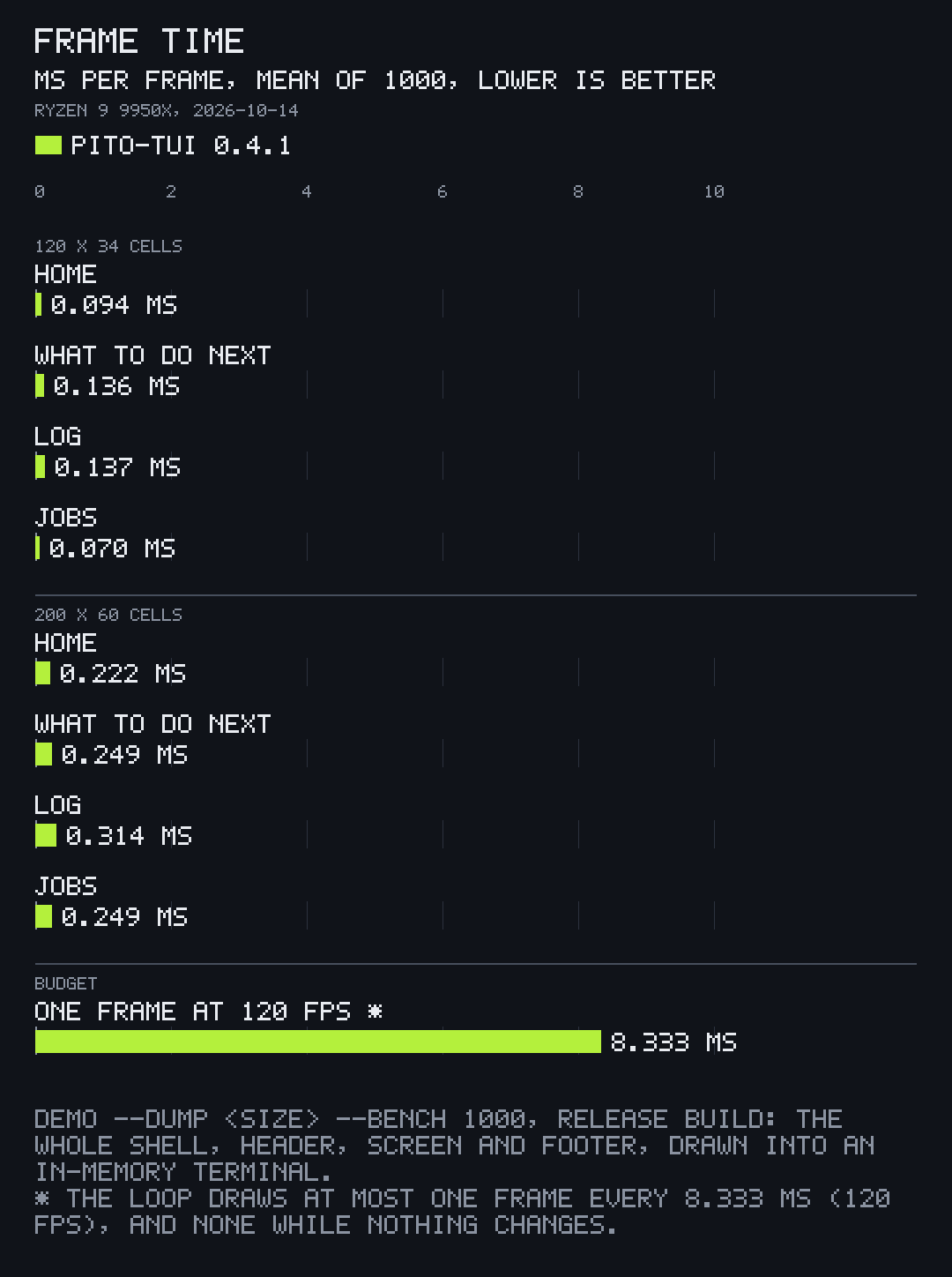
Every screen, and how
The worst frames, every screen at both sizes, the build size and how it was measured are on the Speed page.
Use it
Works on Linux, Windows and macOS. With Rust installed, the same lines work everywhere.
cargo new hello
cd hello
cargo add pito-tui --git https://github.com/gmrdad82/pito-tui --tag v1.3.0pito-tui = { git = "https://github.com/gmrdad82/pito-tui", tag = "v1.3.0" }
That one line brings ratatui 0.30, crossterm 0.29, pito-header v1.0.1,
pito-footer v1.0.1, pito-hourglass v1.0.1 and pito-list v1.0.2,
reachable as pito_tui::ratatui,
pito_tui::header and the rest.
A first screen
Put this in src/main.rs, then cargo run: a
titled screen with a key count, the hints and version in the footer, and
Ctrl+C twice to quit.
use pito_tui::crossterm::event::KeyEvent;
use pito_tui::footer::Hint;
use pito_tui::header::Section;
use pito_tui::ratatui::{Frame, layout::Rect, style::Color, text::Line};
use pito_tui::{Cx, Palette, Screen, Tui, Words, message};

struct Hello {
    presses: usize,
}

impl Screen<()> for Hello {
    fn draw(&mut self, frame: &mut Frame, area: Rect, palette: &Palette) {
        let text = format!("{} keys pressed", self.presses);
        message(frame, area, Line::styled(text, palette.ink));
    }

    fn key(&mut self, _key: KeyEvent, _cx: &mut Cx<'_, ()>) {
        self.presses += 1;
    }

    fn hints(&self) -> Vec<Hint<'_>> {
        vec![Hint::new("any key", "count")]
    }
}

fn main() -> std::io::Result<()> {
    let words = Words::new()
        .help("? help")
        .again("ctrl+c again to quit")
        .yes("Yes")
        .no("No")
        .too_small("Make the window bigger");
    Tui::new("hello", env!("CARGO_PKG_VERSION"), Color::Rgb(0x5b, 0x8c, 0xff))
        .words(words)
        .hints([Hint::new("ctrl+c", "twice quit").pinned()])
        .screen(Section::new("Hello"), Hello { presses: 0 })
        .run()
}
Everything, live
git clone https://github.com/gmrdad82/pito-tui
cd pito-tui
cargo run --release --example demo
cargo run --release --example demo -- --stack
cargo run --release --example demo -- --dump 100x24 --keys "tab down enter"
Ctrl+K in the demo opens a "Go to" list that reaches every screen
and every layer; --stack shows the header as a row stack with groups,
and --mono the monochrome palette.
What's inside
Brings pito-header, pito-footer, pito-hourglass and pito-list with it and re-exports them, so an app pins one crate.
-
01
A header, a footer and screens
Each screen is a type that implements
Screen: it draws its area, takes its keys, and says what it shows in the header and the footer. The shell lays the screens out as numbered tabs in groups, keeps a breadcrumb when a screen drills in, and fits the footer's hints to the width.One Ctrl+C arms the quit guard, a second quits, and while work runs it asks first, in the app's words. Every key goes through one fixed order, so layers never fight over a key.
The header as a row stack: groups, a caption, tabs numbered in their group and focus moving through the rows. -
02
Modals
Cx::open(Modal)puts a centred, titled container over the live screen, built from text, lists and fields: filtered pick lists, search boxes, step menus with a reason field, and forms.A field narrows a list as it is typed, headings are skipped by the cursor, a risky row needs a second Enter, and modals stack, so an alert can sit over a form.
A field narrowing a list, a row that needs a second Enter, and an alert over it. -
03
Bands, takeovers, toasts and gates
A band under the header with a live countdown, a takeover that covers the app with the hourglass during a switch, toasts that outlive a screen change, and a gate in front of the app, such as a lock screen or a sign-in, that takes every key until the app opens it.
A countdown band, a takeover with the hourglass, toasts and a gate. -
04
Activities and real commands
The app hands the shell what it has running, and the shell draws it as a band on the footer and an activity screen that opens over any screen.
Cx::runstarts a real child command and follows its--progress jsonlines live; x stops it with a polite signal, then a kill, and no command outlives the app.A job and a real command on the band, the command stopped, then the activity screen over Home. -
05
A log viewer for 20,000 lines
Logholds the lines once, builds only the rows on screen, and scrolls, pages and jumps to either end. / finds every line holding each word, n and N step through the hits, and the scrollbar and range count show where you are.Drawing the Log screen at 200x60 took 0.314 ms on average.
A find in a 20,000-line log, stepping through the hits and to both ends. -
06
Headless runs, and a terminal always given back
Tui::shotdraws the app at any size after a list of keys,dump::textanddump::ansiprint it,Tui::benchtimes every screen, andcapture::comparereports each cell that moved after a big change. Time comes from the run, never the wall clock, so the same app gives the same frames.Termturns on raw mode, the alternate screen and bracketed paste, remembers each one, and turns exactly those off again on quit, on an error, on a hangup or termination signal, and on a panic, before the panic message prints.A dump, 72x14, after one key $ cargo run --release --example demo -- --dump 72x14 --keys "tab" ──────────────────────────────── demo ──────────────── workspace one ─ 1 Home 2 What to do next 3 Log 5 steps ─ What to do next ──────────────────────────────────────────────────── Step How ▌ Replace this screen Home and Next are two Screen types; s… Set your accent Tui::new takes one colour, or Palette… Add your first command a key in Screen::key, its work in Cx:… Load real data Screen::load returns the read; Screen… Wire the headless flags --dump, --keys, --at, --bench, --capt… ────────────────────────────────────────────────────────────────────── ↑↓ move · enter open · / filter · ctrl+k go to · ctrl+c twice quit -
07
Lists that fit the width
Every list's columns make room as the terminal narrows: each carries a drop priority, so they go in that order while pinned ones stay and the message clips with an ellipsis, and as it widens they come back in order.
Columns drop by priority as the terminal narrows, and come back as it widens.
Where PITO MD runs it
The shell of PITO MD's terminal apps, and the crate that ties its terminal widgets together.
-
Four widget crates
One pin, the whole family
pito-header draws the groups, tabs and breadcrumb at the top, pito-footer the hints, notice line, confirm and quit guard at the bottom, pito-hourglass the Braille hourglass while a screen loads, and pito-list the rows, scrollbar and range count of every list.
pito-header's docs -
prec
Recorded frame by frame
Every clip on this page is a demo recorded by prec in a pseudo-terminal, from pito-tui's and pito-list's own tapes.
See prec -
pito-compare
Charted by pcmp
The frame-time charts on this page are drawn by pcmp from the demo's own bench numbers.
See pito-compare
Read it. Run it. It's MIT.
The code is MIT licensed, © Catalin Ilinca: read it, fork it, ship it in your own work. The PITO MD name and its logos, and the names and logos of every PITO MD app and game, are © Catalin Ilinca, all rights reserved, and are not covered by the MIT licence.
Issues and pull requests are welcome on GitHub. A change keeps bin/gate green with no warnings and leaves every word, style and key to the app.
Credits
The pito-tui clips are captures of pito-tui's own example, recorded with
prec from its terminal shots and made into GIFs; the charts are drawn by
pito-compare from the example's own frame-time bench and the numbers its
README states. The pito-list clip is a capture of pito-list's
examples/demo.rs, recorded with prec and made into a GIF with
pcod, from pito-list v1.1.1, © 2026 Catalin Ilinca under the MIT licence
like the code.
The look of the crates it brings is in the style of HEY's terminal UI by 37signals (basecamp/hey-cli, MIT); the hourglass's frames and timing come from hey-cli under its MIT licence. No code or text of hey-cli is copied into pito-tui.
Set in Archivo by Omnibus-Type and Atkinson Hyperlegible Mono by the Braille Institute, both under the SIL Open Font License.