
prec
prec records terminal apps into exact videos and stills, an alternative to VHS. You write a tape of keystrokes; prec runs your app in a real pty, records the session once, then replays it frame by frame in headless Chromium at exactly 24, 30, 48, 60 or 120 fps or the NTSC rates, at any size up to 4K. The same recording always replays to the same bytes.
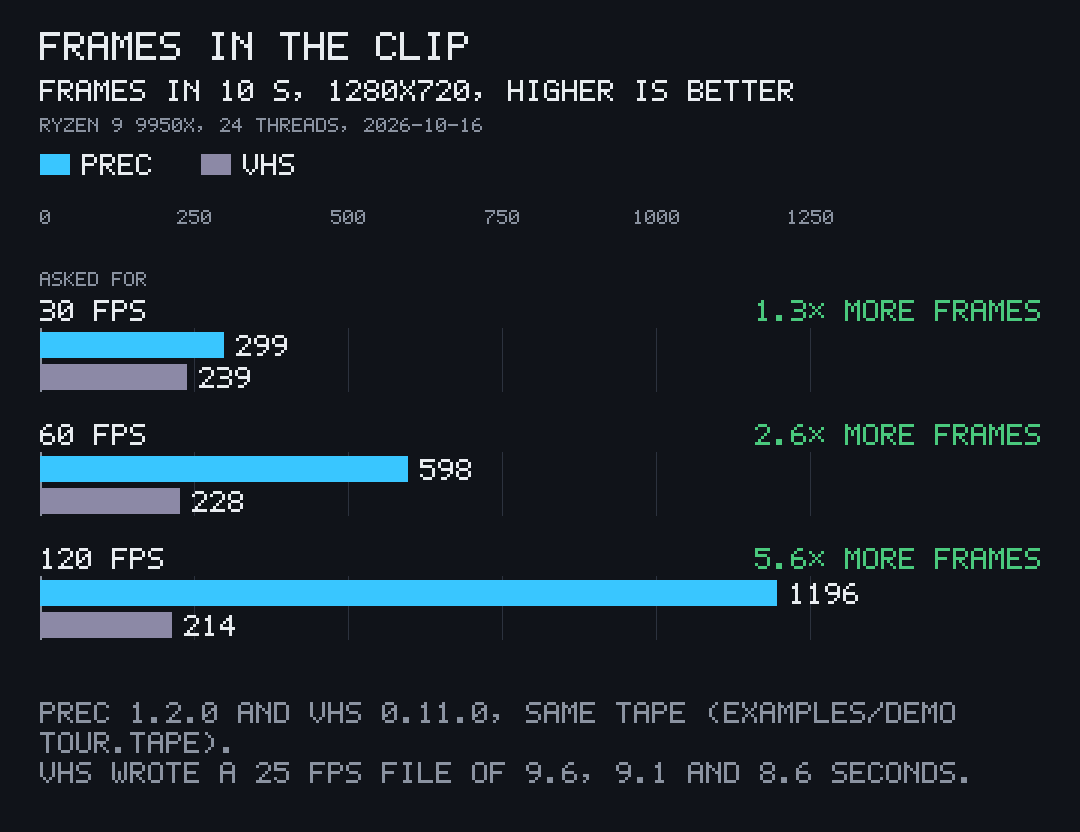
1,196 frames in a 10 s clip at 120 fps. Every one. VHS v0.11.0 on the same tape: 214 frames, in a 25 fps file. Measured 2026-10-16 on an AMD Ryzen 9 9950X, both tools pinned to the same 24 threads, with prec 1.2.0, as prec v1.4.6's README states.
-
Every frame, at the rate you ask for
prec records your app once, then replays it frame by frame at exactly the rate you ask, up to 120 fps and 4K.
More on Replay -
Record once, render many
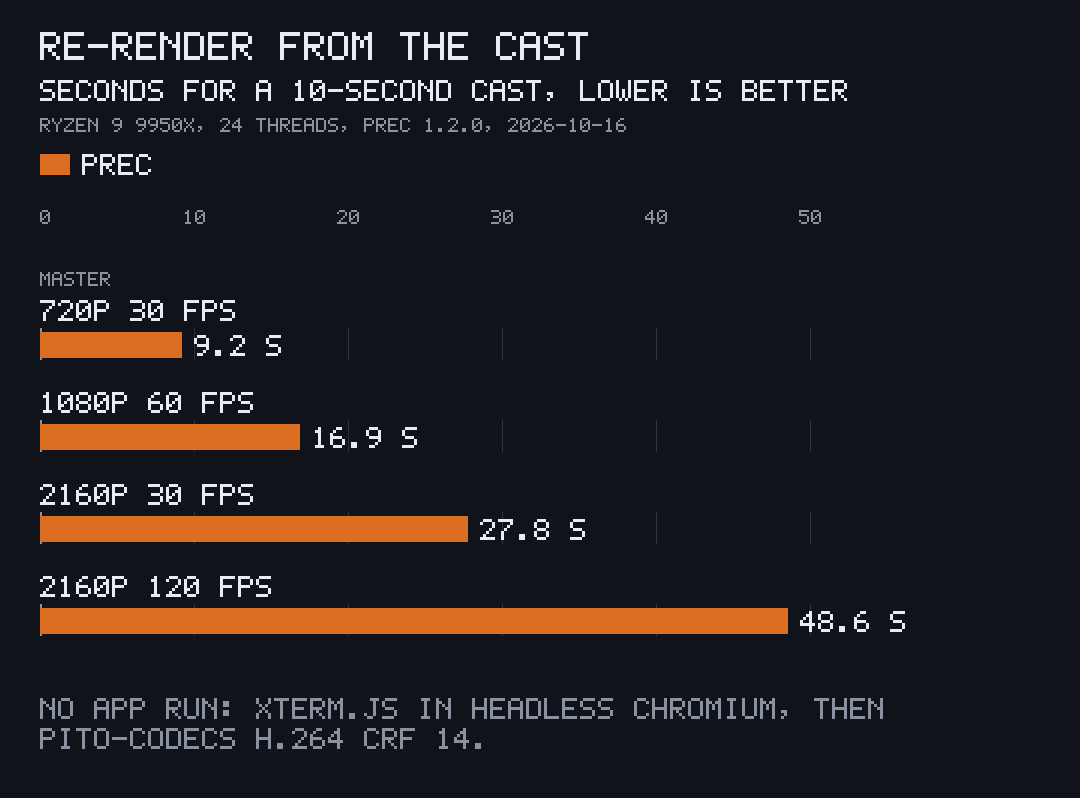
Re-render a cast at any size, rate or theme with no app run, and get the same bytes every time.
More on Render many -
Tapes and shots in your repo
Each app keeps its own
More on Tapesrender/terminal.tomland tapes; prec builds the app, records the shot and keeps your data out of the picture.
- 1,196 frames in a 10 s clip at 120 fps; VHS on the same tape: 214
- 16.9 s to re-render a 10 s cast at 1080p 60 fps, without running the app
- Same sha256 two renders of one cast give byte-identical masters
- 3840x2160 any size up to 4K, at 24 to 120 fps or the NTSC rates
- 5.7 MB one binary, its H.264 encoder built in; prec downloads nothing
Terminal clips you never re-record by hand
Write the keystrokes once. Get the same clip, frame for frame, every time you render it.
What it's for
- Clips and stills of a TUI or a command line for a README, docs, release notes or a site, recorded from a tape instead of by hand.
- Rendering one recording again at another size, rate or theme, without running the app again.
-
Recording a tag or a commit with
--rev, so the clip shows exactly the release it belongs to. - Keeping private data out of the picture: a clean environment, a scratch home, masks, and a scan that refuses a frame showing your home path, hostname, user name or an email.
Who it's for
- Authors of terminal apps who want every frame in the clip and the clip exactly as long as the tape.
- Projects that re-record their docs after every change and want the same tape to give the same bytes.
- Anyone on VHS who needs more than 25 fps, or 4K drawn at its own pixels.
Speed
One run of prec's docs/bench/bench.sh on 2026-10-16: an AMD Ryzen 9 9950X on Linux, prec 1.2.0 and VHS v0.11.0 pinned to the same 24 threads, recording the sample app's 10-second tour.tape at 1280x720.
Every row, and how
The wall times, where VHS finishes sooner, the re-render times from 720p to 4K, the binary's size and the bench that took them are on the Speed page.
Use it
prec runs on Linux (x86_64), on Windows through WSL, and on macOS (Apple Silicon). Each release carries a Linux and a macOS binary with a SHA256SUMS file; on Windows, run the Linux one in WSL.
v=$(basename "$(curl -fsSLo /dev/null -w '%{url_effective}' https://github.com/gmrdad82/prec/releases/latest)")
mkdir -p ~/.local/bin && curl -fsSL "https://github.com/gmrdad82/prec/releases/download/$v/prec-$v-linux-x86_64.tar.gz" | tar -xz -C ~/.local/bin precv=$(basename "$(curl -fsSLo /dev/null -w '%{url_effective}' https://github.com/gmrdad82/prec/releases/latest)")
mkdir -p ~/.local/bin && curl -fsSL "https://github.com/gmrdad82/prec/releases/download/$v/prec-$v-macos-arm64.tar.gz" | tar -xz -C ~/.local/bin prec
~/.local/bin needs to be on your PATH. From
source, with Rust 1.97 or newer: cargo install --locked --git https://github.com/gmrdad82/prec --tag
v1.5.1 prec. On macOS the binary is built on an Apple Silicon Mac; renders on a Mac
are untested.
What it drives
- Chromium or Google Chrome, run headless.
-
fontconfig, the default font JetBrainsMono Nerd Font (or pass
--font), and a CJK font for wide characters. - git and bash.
prec doctor checks all of it and says what is missing. On macOS,
point chromium in the config at
/Applications/Chromium.app/Contents/MacOS/Chromium.
# Debian or Ubuntu
sudo apt install chromium fontconfig fonts-noto-cjk git
# Arch
sudo pacman -S chromium fontconfig noto-fonts-cjk ttf-jetbrains-mono-nerd git
# macOS with Homebrew
brew install fontconfig git
brew install --cask chromium font-jetbrains-mono-nerd-font
Your first clip in 30 seconds
git clone https://github.com/gmrdad82/prec && cd prec
prec doctor
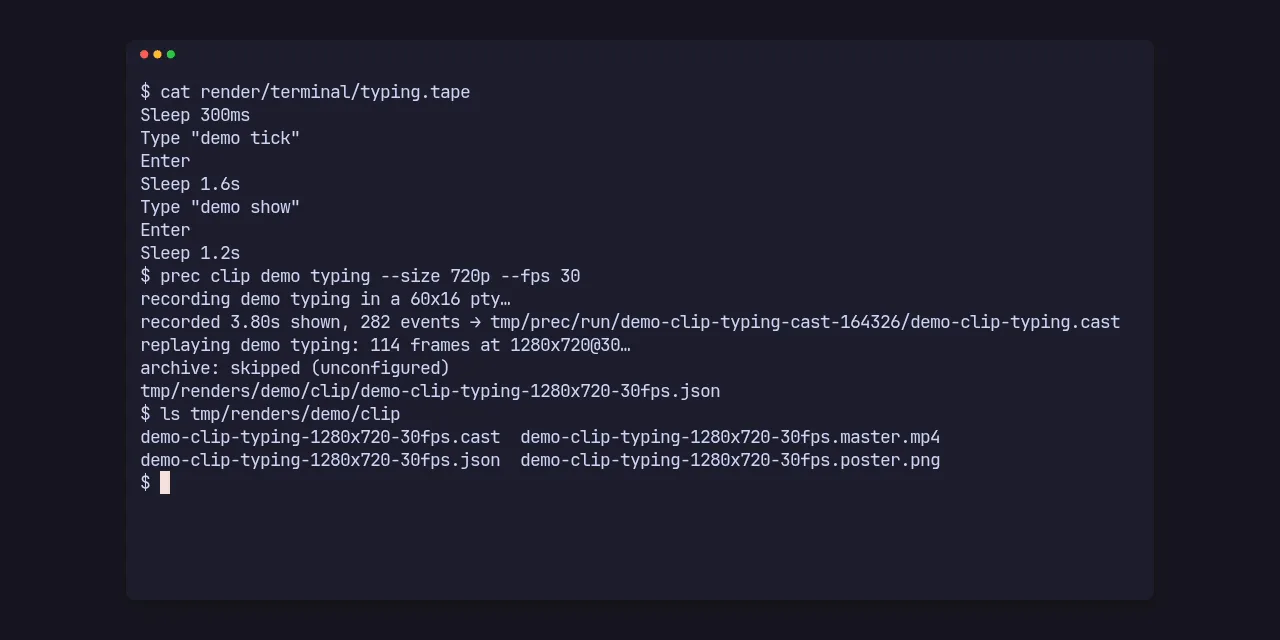
prec clip demo typing --app-dir examples/demo --size 720p --fps 30
That records the repository's sample app from its tape and writes the
master MP4, its poster PNG, the cast and a JSON manifest under
tmp/renders/demo/clip/. Turn the master into a GIF with pcod
from pito-codecs: pcod <master> demo.gif --size 1280 --fps 15.
In your app's repository
prec shots myapp
prec clip  myapp tour --size 1080p --fps 60
prec still myapp palette --size 2160p --derive 1080p --web 800
prec clip  myapp tour --rev v1.4.0 --themes "Catppuccin Latte,Catppuccin Mocha"
prec render tmp/renders/myapp/clip/myapp-clip-tour-1920x1080-60fps.cast --size 720p --fps 30app = "myapp"
bin = "myapp"
grid = [120, 34]
frame = "bare"
setup = "{bin}/myapp-fixture >/dev/null"
teardown = "myapp server --stop || true"
[build]
command = "cargo build --release --locked --bin myapp --bin myapp-fixture"
bin_dir = "{target}/release"
[env]
MYAPP_DATA = "{scratch}/data"
MYAPP_NOW = "2026-09-29T10:00:00Z"
[theme]
background = "#eff1f5"
foreground = "#4c4f69"
[shots.tour]
kind = "clip"
line = "The terminal workspace stepping through its views"
tape = "render/terminal/tour.tape"
launch = "myapp tui"
settle = "3s"
closure = "palindrome"What's inside
10,912 lines of Rust, a vendored xterm.js 5.5 and pito-codecs' H.264 encoder, in one binary.
-
01
Every frame, at the rate you ask for
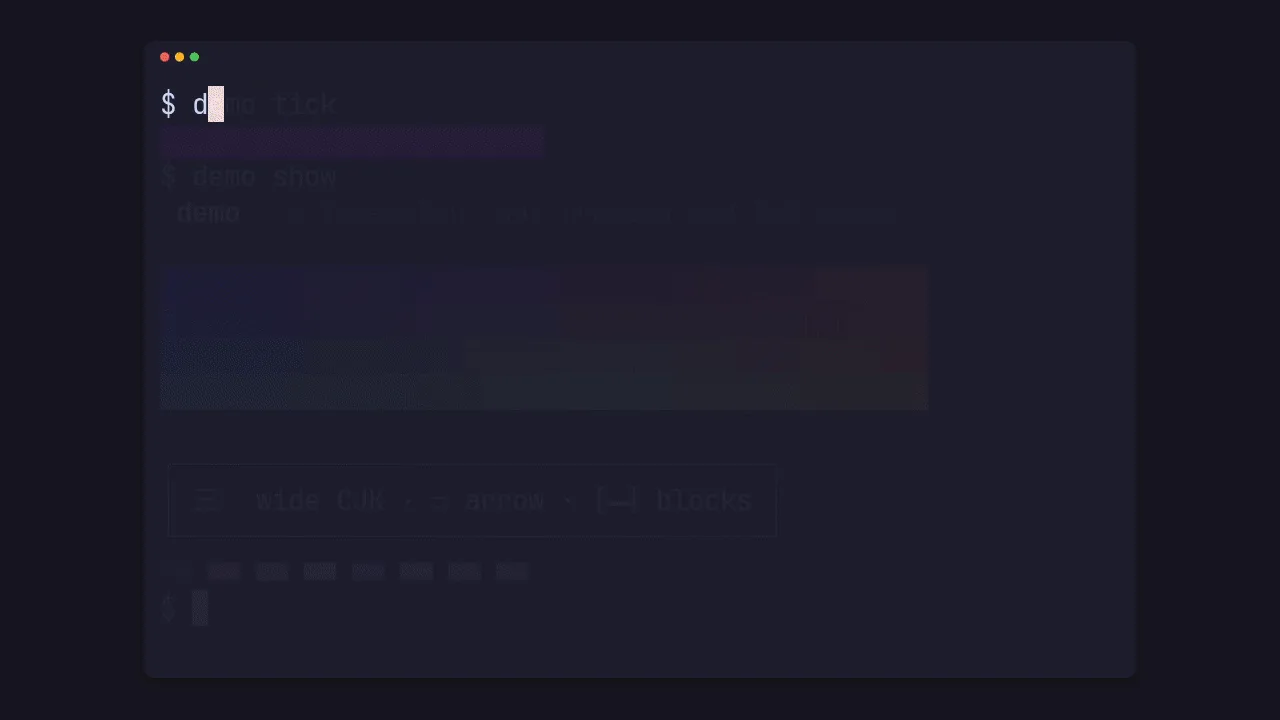
prec doesn't capture the screen while the app runs. It records the app's output bytes with their timestamps, then steps a virtual clock at exactly 1/fps and draws each frame, so a clip has the shown time times the fps in frames, however heavy the frame or the rate.
A clip is one silent H.264 master (CRF 14, BT.709 limited range, tagged), a poster PNG and a JSON manifest with each file's sha256.
The sample app's typing shot: a progress bar, a truecolor gradient, a wide CJK character and the 16 ANSI colours, ending in a crossfade. -
02
Wait for the screen, not the clock
A tape holds only steps: text to type and keys to press, such as Enter, Tab, Shift+Tab, Esc, , PgUp, Ctrl+C or Alt+Enter, each with an optional delay and repeat count.
Wait /ready/returns as soon as the screen matches, andIdle 3sonce the screen, colours and cursor included, has stayed the same for 3 seconds, as when an agent session finishes. The size, theme and font live in the app's config, so one tape renders at any of them.typing.tape, the sample app's Sleep 300ms Type "demo tick" Enter Sleep 1.6s Type "demo show" Enter Sleep 1.2sA tape that waits Type@0ms "myapp tui" Enter Wait /ready/ Down@200ms 3 Enter Ctrl+C -
03
Native pixels at every size
The grid is fixed and the font is fitted to each size, so 4K shows exactly what 720p shows, drawn at its own pixels rather than scaled.
xterm.js 5.5 with Unicode 11 widths draws truecolor, box drawing, wide CJK and Nerd Font glyphs.
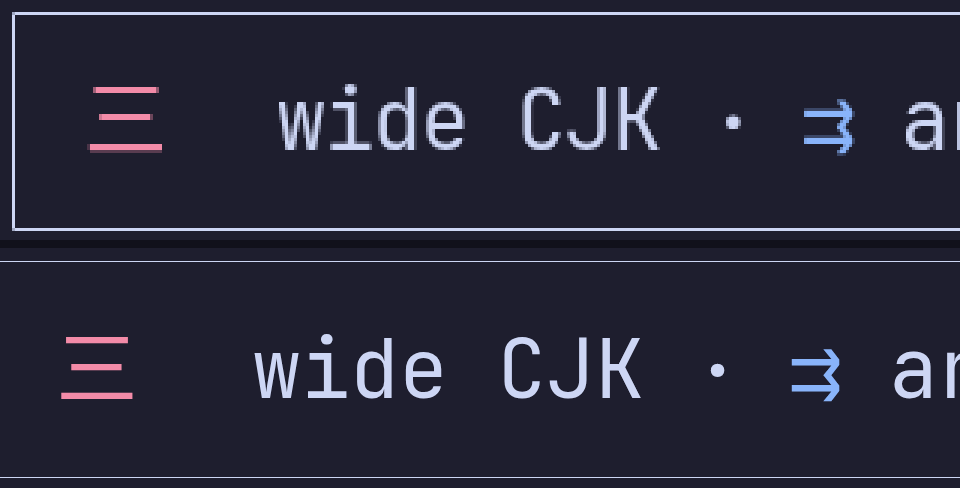
Top: a crop of a 1280x720 still, enlarged three times. Bottom: the same crop of the 3840x2160 still from the same tape. -
04
348 themes, light and dark from one recording
The app's own palette, any of VHS's 348 built-in schemes, curated light and dark pairs, and your installed Omarchy themes.
--themesrenders one recording in several at once.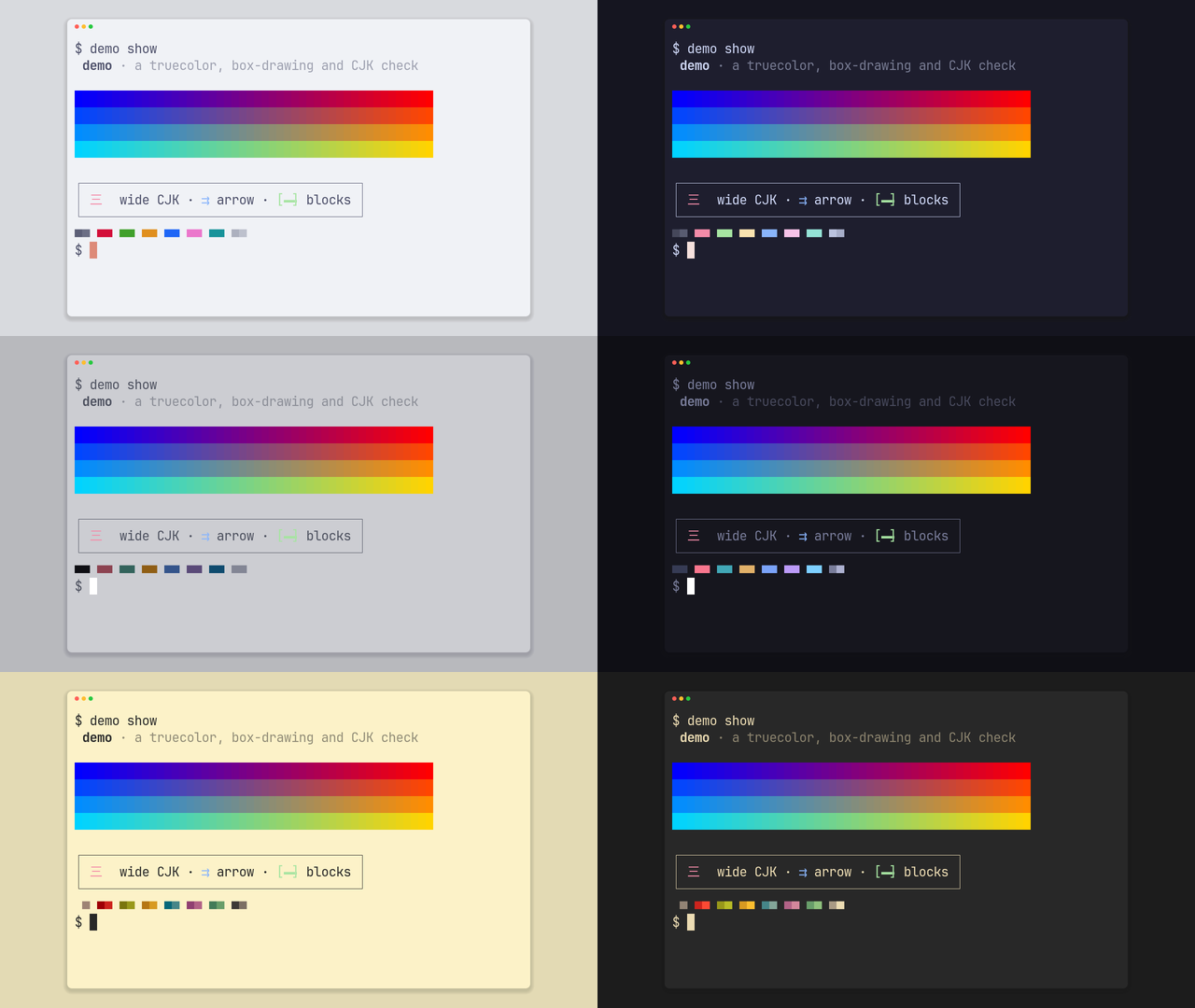
Six themes from one run of prec still demo palette --themes …: Catppuccin, Tokyo Night and Gruvbox, light and dark. -
05
A window, or the app to the edges
--frame windowdraws a window with its bar and shadow on a ground;--frame bareleaves the app's own ground to the edges, for a TUI that fills its terminal.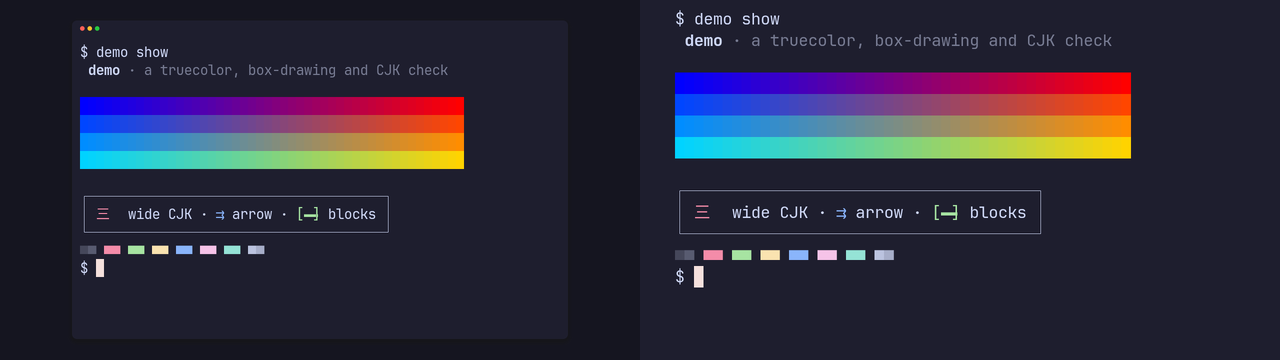
The same still, windowed and bare. -
06
Your data stays out of the picture
The pty starts from a clean environment with a scratch
HOME.pass_envhands named variables to the app, and the cast lists the names, never the values. On Linux,homeruns the session in its own namespace with the home and hostname you choose.Before a replay, prec reads the screen the cast shows and refuses a picture with your home path, hostname, user name, an email or a passed value, one line per finding at its shown second. Masks fill a regex match or a block of cells in every frame.
Record, replay, encode
- Record. The app runs in a pty of exactly the grid, driven by the tape at real speed, kept as an asciicast v2 cast.
-
Replay. A vendored xterm.js in headless Chromium, started with
a scratch home,
TZ=UTCandC.UTF-8, so your locale and fontconfig never reach it. - Encode. Fixed encoder threads, so a master is byte-identical on any machine; prec reads the MP4 back and checks its frame count before the manifest claims it.
- Atomic. A failed or cancelled re-render never leaves new files beside an old manifest.
Where PITO MD runs it
The terminal half of PITO MD's renders.
-
pitomd.com
Splicer's guide shots
The terminal shots in Splicer's guides on this site are recorded by prec, from Splicer's released binary and a tape.
See Splicer -
Open source
The clips on these pages
prec recorded the terminal clips of pito-codecs, pito-compare and pito-tui shown on their pages, each from that repository's own shot.
See pito-tui's -
pito-codecs
Masters with no ffmpeg
Its masters are encoded inside prec by pito-codecs, and pcod turns them into GIFs, WebP and web MP4s.
See pito-codecs
Read it. Run it. It's MIT.
The code is MIT licensed, © Catalin Ilinca: read it, fork it, ship it in your own work. The prec and PITO MD names and their logos are © Catalin Ilinca, all rights reserved, and are not covered by the MIT licence. The vendored xterm.js and VHS themes keep their own MIT licences.
Issues are welcome on GitHub: a bug with the command line, your terminal.toml and tape, and what prec doctor says, or an idea for something prec should record. Pull requests aren't taken.
Credits
The clips are prec's own: record.gif from its shot of itself and typing.gif from its sample app, recorded by prec and made GIFs by pcod; the stills are prec renders of the sample app's palette shot, laid side by side. The charts are drawn by pito-compare from prec's docs/bench data and from numbers its README states.
prec vendors xterm.js 5.5.0 and VHS v0.11.0's 348 colour schemes, both under the MIT licence; their notices are in its NOTICE.
Set in Archivo by Omnibus-Type and Atkinson Hyperlegible Mono by the Braille Institute, both under the SIL Open Font License.