An instant first frame
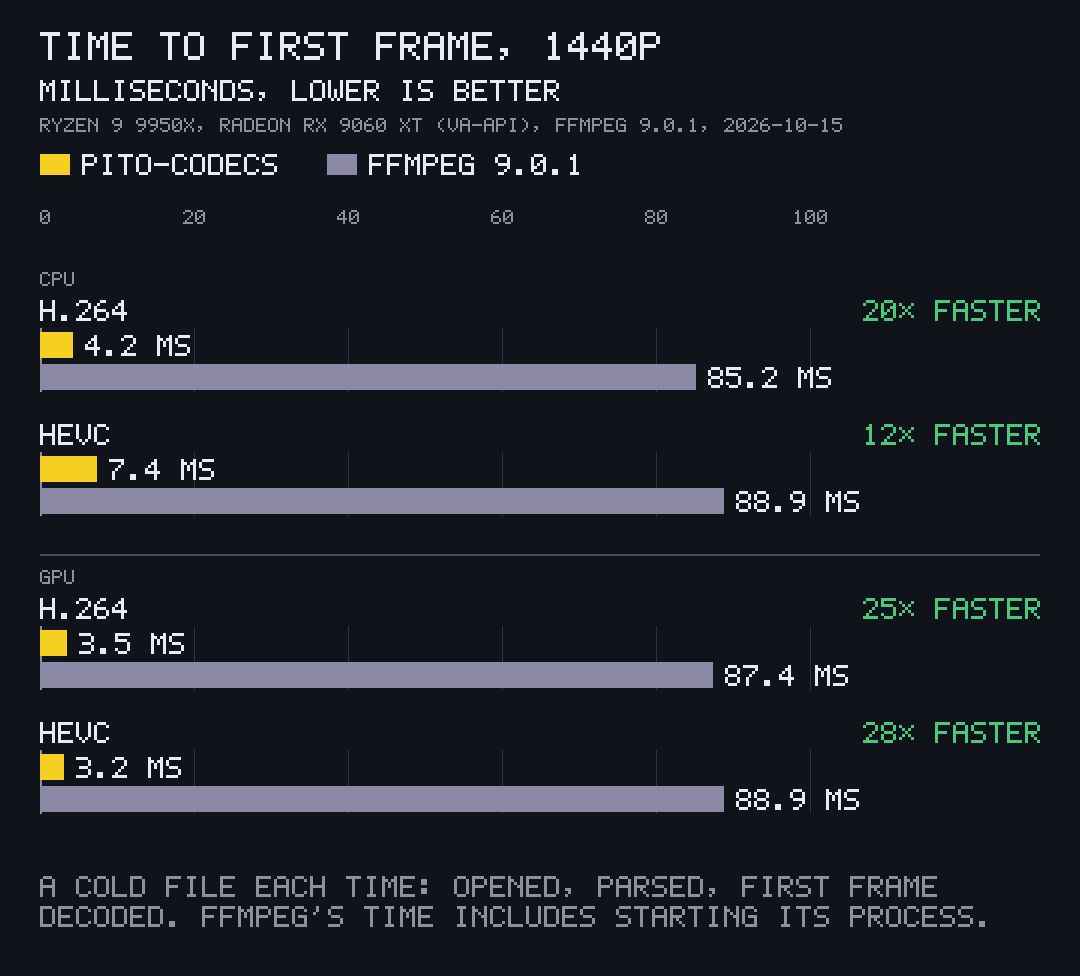
Open a file and show its first picture 12× to 28× sooner than ffmpeg, whose time includes starting its process.
What it does
Opening a file and showing its first picture takes 4.2 ms for 1440p H.264 on the CPU and 3.2 ms for HEVC on the GPU. That is 12.1× to 28.2× sooner than ffmpeg, whose time includes starting its process, which is what an app calling it pays.
first_frame runs inside your own process and tries the GPU first and pito-codecs' own CPU code second. When it falls back, it says why in a plain reason an app can show.
-
No process to start
There is no ffmpeg to spawn and no C library to link: the decoders are Rust in your binary, and libva is loaded at run time on Linux, so a binary starts on a machine without it.
-
A long MKV costs what a short one does
An MKV or WebM file opens for video from its headers and Cues alone, then seeks through the Cues. Every caller that opens the same file at once shares one read.
-
Seeks skip what nothing refers to
A seek decodes from the keyframe before the target and skips the pictures on the way that nothing refers to, on the card and on the processor, with every shown frame unchanged.
-
AV1 too
AV1 in MP4, MKV and WebM shows its first frame on the card through VA-API and on the processor through a port of rav1d, every frame of the test streams bit-exact with dav1d.
Measured
- H.264 at 1440p on the CPU, 20.2× sooner than ffmpeg's 85.2 ms (ffmpeg includes starting its process)
- 4.2 ms
- How it was measured
- H.264 at 1440p on the GPU, 24.9× sooner than ffmpeg's 87.4 ms (ffmpeg includes starting its process)
- 3.5 ms
- How it was measured
- HEVC at 1440p on the CPU, 12.1× sooner than ffmpeg's 88.9 ms (ffmpeg includes starting its process)
- 7.4 ms
- How it was measured
- HEVC at 1440p on the GPU, 28.2× sooner than ffmpeg's 88.9 ms (ffmpeg includes starting its process)
- 3.2 ms
- How it was measured
- first frame of a 4.4 GB, 71-minute MKV over a gigabit network share; 193 ms at 35 minutes, reading 6.3 MB each time
- 110 ms
- How it was measured
- first AV1 frame at 240 px on the card, 38 to 46 ms on the processor; ffmpeg with dav1d 89 to 119 ms
- 26–71 ms
- How it was measured
How to use it
-
Add the library with the parts you need; all are on by default.
[dependencies] pito-codecs = { git = "https://github.com/gmrdad82/pito-codecs", tag = "v1.16.3", default-features = false, features = ["h264", "hevc", "vp9", "aac", "mp4", "mkv", "gpu", "filter", "opus", "ac3", "mp3"] } -
Let it pick the fastest route:
probereads the file,first_frameshows it at the height you ask.use pito_codecs::media::{Prefs, first_frame, probe}; let prefs = Prefs::default(); let info = probe("clip.mp4".as_ref(), &prefs)?; let still = first_frame("clip.mp4".as_ref(), 240, &prefs)?; -
Or from the command line, with pcod:
pcod probe clip.mp4
pcod decode clip.mp4 --route gpu