

Loudness while you record
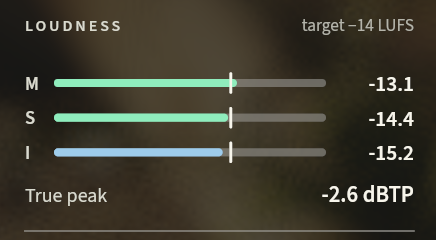
Momentary, short-term and integrated LUFS and true peak, live, with the −14 LUFS and −1 dBTP targets marked.
What it does
Manfred measures your loudness while you record: momentary, short-term and integrated LUFS, and true peak. The −14 LUFS and −1 dBTP targets are marked beside them, so you see where you stand while you talk.
The meters follow the gated sound, the one you export, so what you see is what you record. The pond answers the same sound: each syllable sends a ring from the microphone's stone, as tall as you were loud.
When a take is flat-topped, at any level, Manfred warns you and says where to turn the gain down.
-
The gain in reach
Drag or scroll the MIC knob on the stone to set your microphone's gain in the system, on Linux with PipeWire and on Windows.
-
In the terminal too
manfred tuishows the same loudness while it records the microphone. -
Almost free to run
The loudness meter and the peaks take about a tenth of a percent of one core.
Measured
- of one core for the whole of Manfred while it records, over its 0.5% budget
- 1.55%
- How it was measured
How to use it
-
Switch MIC on: the pond answers your voice before you press REC.
-
Press REC and talk. The loudness runs in the panel with the time.
-
If Manfred says the take is flat-topped, turn the gain down where it says.
-
The same meters in the terminal workspace:
manfred tui