

Manfred · features
Record. Check your level. Export.
Three faces: the window, the only one that records the webcam; the terminal workspace; and the commands, which work from any terminal. Every picture here is captured from the real app.
-
Record
The window records the webcam with the microphone into one file, in sync; the terminal workspace and the commands record the microphone. A noise gate, on by default, silences the room between your words and opens just before a soft word starts; one switch and one sensitivity slider under the microphone list set it. Every gated take keeps the untouched microphone too, so the gate never costs you a take. The video is H.265 encoded on the GPU, with H.264 when H.265 isn't available. Pause and resume a take, and play a recording back to your speakers with a seek slider that starts playing at once.
A take with the camera on. -
The pond answers your voice
A stone pond garden at golden hour, where the water answers your voice. Each syllable sends a ring from the microphone's stone, as tall as you were loud; a stereo microphone rings from two stones, one per channel. The pond listens as soon as the microphone is on, before you press Record. The pond, the meters and the waveform follow the gated sound, so what you see is what you record.
Sound alone: the pond answers the voice. -
Never lose a recording
A recording is written to disk as it happens, chunk by chunk, each one checked. If Manfred is killed, what it had written is kept; if the power goes, at most about the last half second is lost. A recording that was never finished opens as recovered, with everything before the cut.
-
Small files
Sound is compressed losslessly as it is recorded, to about 42% of its raw size for speech: an hour of speech takes about 217 MB instead of 518 MB. A gated take is no larger, since the gated sound is rebuilt from the untouched microphone, and a raw export gives back the recorded bytes exactly.
-
See yourself as you talk
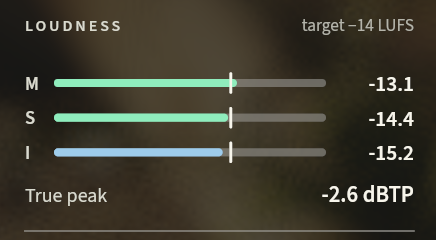
Loudness, momentary, short-term and integrated LUFS and true peak, is live while you record, with YouTube's −14 LUFS and −1 dBTP targets marked. Manfred warns when a take is flat-topped, at any level, and says where to turn the gain down.
-
Turn, mirror and flip the camera
Per camera: the preview and the recording follow it, and MP4 exports carry it so players show it the right way up.
The camera turned 90° each way: wide to tall and back. -
Transcribe
Manfred writes the transcript on your own machine, in English and Spanish, and catches a switch between them. The speech engine and model are inside Manfred: nothing is uploaded, and nothing downloads after install.

-
Export
Four exports: the sound as WAV; the video as MP4 with the recorded H.265 or H.264 stream copied untouched; sound and video as MP4; and the transcript as SRT subtitles. Exports use the gated sound, rebuilt exactly as the gate shaped it while you recorded; the Raw microphone switch exports the untouched microphone instead, bit for bit as recorded. Each asks where to save through the system's save dialog.

-
In the terminal too
manfred tuiopens the terminal workspace: Record, Open and Export screens, the loudness and a live waveform, and your last ten recordings one key away, shared with the window.manfred <command>works from any terminal and records the microphone; add--jsonfor structured results and errors.
Manfred's captures run its built-in demo, with no real recording, camera or microphone. The face in the camera picture is a contour drawing made for Manfred by hand, not a real person. The medallion carries the Manfred mark, © Catalin Ilinca, all rights reserved. The pond garden uses Poly Haven assets under CC0 1.0. The voice that moves the pond, the meters and the face is the opening of “A Message of Resilience from the International Space Station” by NASA Johnson, in the public domain; the captures carry no sound.