

Why I built my own engine
I wanted my engine to do apps, games, presentations, films and everything I dreamed of. One thing. Mine. And for years I didn’t have it, so I did what everybody does: I went shopping for tools.
Blender, for the renders. I opened it, I looked at it, I closed it. It’s a miracle of a program and it’s a full career on its own, and I didn’t have time to learn Blender, and other software, and then the other software that the other software needs. I have a job. I have a closet full of ideas waiting since forever. I’m not gonna spend a year becoming a 3D artist so I can get a nice shot of a desk.
Unreal, for the games. I don’t have dozens of GBs to store Unreal on every machine, for every project, for the small and fast games I make. Unity? I’m not gonna track Unity’s chaotic launch schedule to know if my game still builds next month. And Godot, the good guy, the open one, I really tried it. I didn’t like the Godot editor and its node structure. That’s me, that’s my taste, plenty of people love it and that’s fine. I just kept fighting the shape of the tool instead of making the shape of the game.
And every time, same story: I was cutting my dreams so they fit somebody else’s tool.
So I stopped. I stopped shopping and I built my own engine. It’s called pfx.
From first scene to shipped game, or to finished film, in one engine. Freaking fast, light and simple.
I’m building tools for my dreams. I’m not dreaming for my tools.
So what is it? pfx is a game and render engine, written in Rust. It draws scenes live at 4K. It path-traces stills and clips with its own denoiser. It builds scenes from recipes, edits them in its own editor, plays them as games with physics, sound and input, and cuts clips and title cards into films. All of that, one tool, one binary, my release schedule.
Presentations? Still part of the dream. The film cards and the timeline are real today, but a deck I would stand in front of people and click through, no, pfx doesn’t do that, and I’m not gonna pretend it does.
That’s the live renderer. Not a video of a render. That’s the thing drawing itself, at 4K, while the camera moves.
Why does it look like that? Because I wanna create games, not program systems from scratch and learn manuals. I wanna stay pure to the game design. When I sit down at night, I want to work on the game, the idea, the fun part, and not on the plumbing under it.
So pfx comes with the plumbing already in. And the first minute of a new game looks like this:
git init my-game
pfx new my-game
cd my-game
cargo run --release
cargo run --release -- edit
That’s a game running in a window, and then the same game open in the editor. Fifteen files. An AGENTS.md and a CLAUDE.md are in there too, because I build with agents and every new game should know how to work with them from minute one.
And pfx bench at the end of that clip plays it headless for 3 seconds: 180 frames, 0 dropped. Before I even touched anything.
But making games doesn’t mean I don’t wanna get my hands dirty. I wanna be able to tweak everything. Every light, every material, every value. But I also wanna have something to help me with it, because I’m one guy and the night is short.
The editor is there for the hands-on part, and I use it all the time.

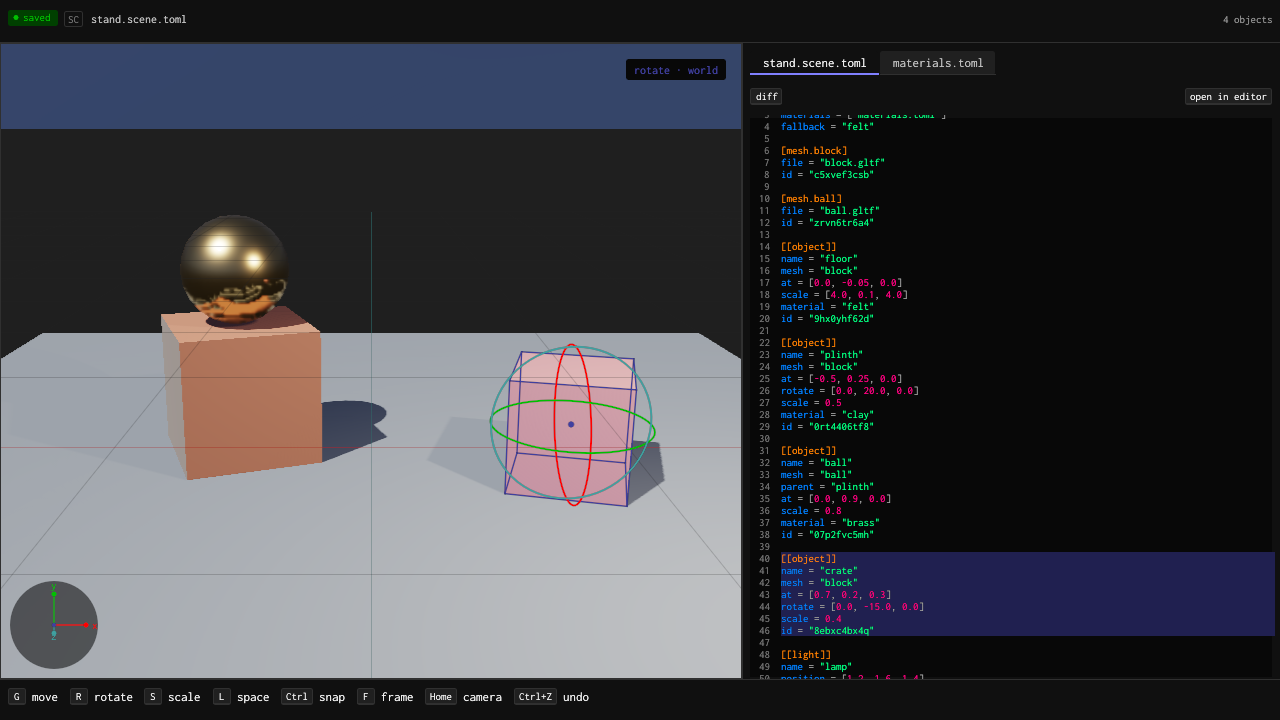
Under the editor, the scene is plain TOML inside a .pitofx file. The editor shows it right next to the viewport, so when I drag a crate I see exactly which line changed.
And now the part I care about most: every pfx feature is a command. I wanted AI to help me deterministically, and avoid hallucinations. No guessing what some plug-in will do, no pretending to drive a window.
So pfx is built command line first. Everything the editor does, a command does too. I type it, a script types it, an agent types it, same thing:
pfx add desk.pitofx object lamp2 kind=sphere radius=0.1 at='[0,2,0]' material=brass
pfx duplicate desk.pitofx object lamp2 lamp3 at='[1,2,0]'
pfx remove desk.pitofx object lamp3
pfx build desk.pitofx
Every one of those either does exactly what it says and writes it back into the file, or it refuses, tells you why in one line, and leaves the file the way it was. There’s no half-edit. An agent can’t leave my scene broken in the middle, because there’s no middle. So I let it do the boring part, placing forty lamps, renaming materials, keying a camera, and I do the deciding.
And the build is deterministic. Same recipe, same seed, same bytes, on any machine. If something changed, the file tells you what. That’s how I check an agent’s work: I don’t trust it, I build it and compare.
But don’t get me wrong, determinism alone is not why I built this. A deterministic tool that makes me wait is still a tool that makes me stop thinking. It’s never one or the other. It’s both. Deterministic and freaking fast, every time, or it’s not pfx.
And speed. I wanted freaking speed. And not because I have a bad computer, I don’t, but because I find it mandatory to be freaking fast. A tool that makes me wait kills the idea right there.
So here are the numbers, measured, each one with its method written down in pfx’s docs.
The live renderer draws the neutral room at 4K in 4.4 ms of GPU a frame. At p50 and at p99, 0 frames dropped out of 1,200. A 120 fps frame gives you 8.33 ms. pfx uses about half of it, and the rest is for the game.
And the frame rate is your call: VRR on or off, on by default, and a frame rate of a 60 fps cap, a 120 fps cap, Uncapped or Auto. A game starts Uncapped; the editor times its first 60 frames and picks Auto if their median misses 8.33 ms, Uncapped if it doesn’t. Auto aims at 120 and settles to a steady lower rate when a scene can’t hold it.
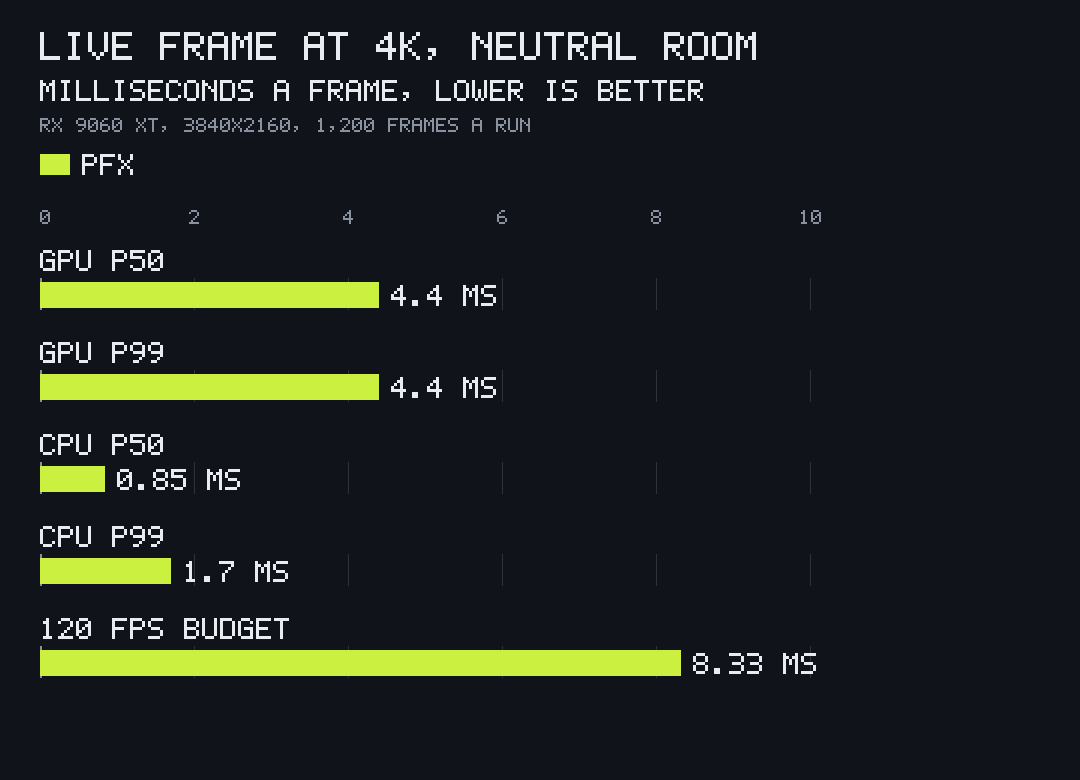
When nothing moves, pfx uses 0 ms of GPU. Zero. It draws a frame when something changes and otherwise it shuts up. A paused game or an editor I forgot open while I made coffee doesn’t cook my laptop. A drifting camera costs 0.50 ms.
The 2D pass draws 2,000 shots and 20,301 particles at 4K in 0.36 ms.

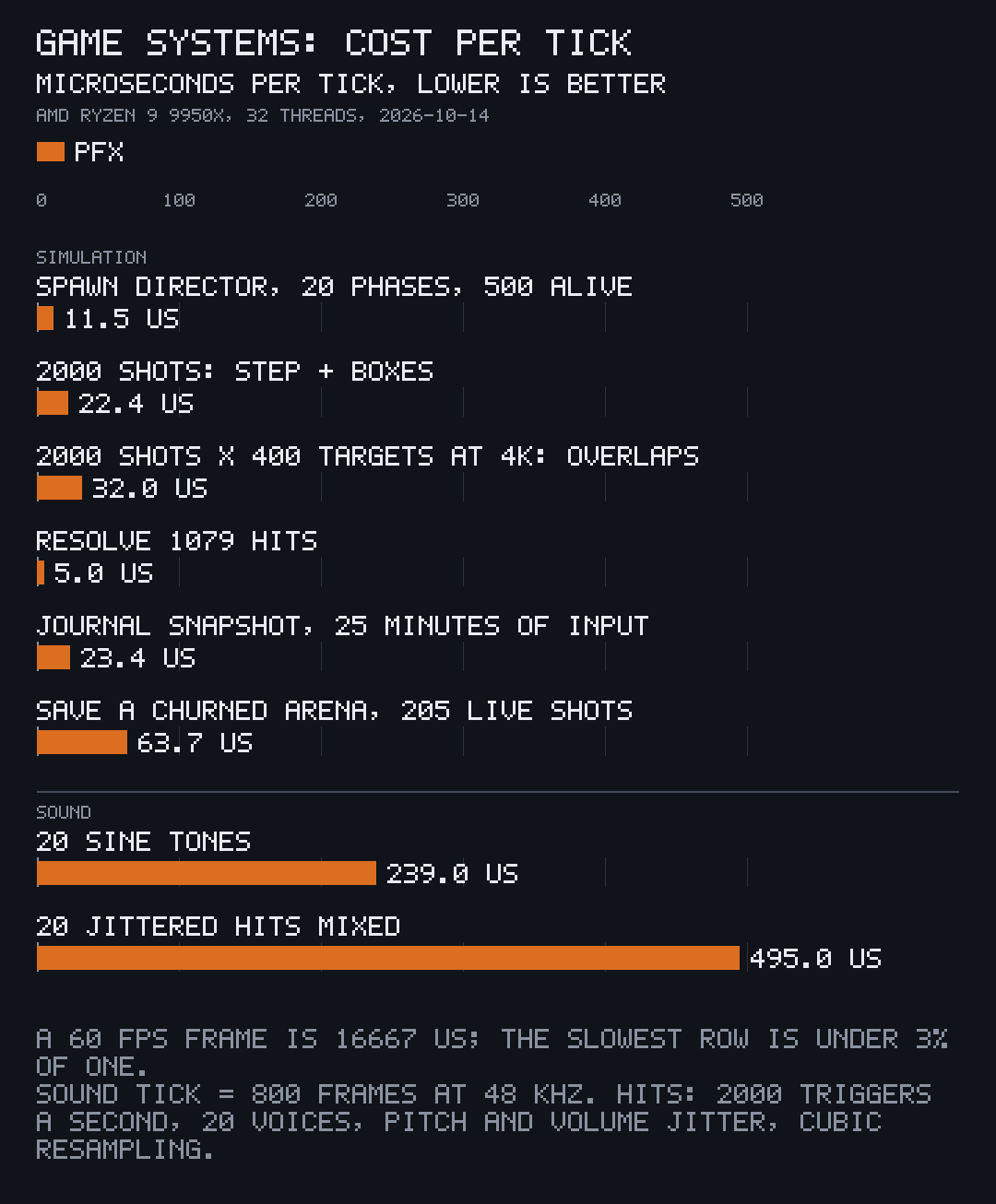
The game systems are in microseconds, one thread. 2,000 shots stepped in 22.4 µs. 1,079 hits resolved in 5 µs. The biggest one, 20 sound hits mixed, takes 495 µs, and a 120 fps frame has 8,333 of them.
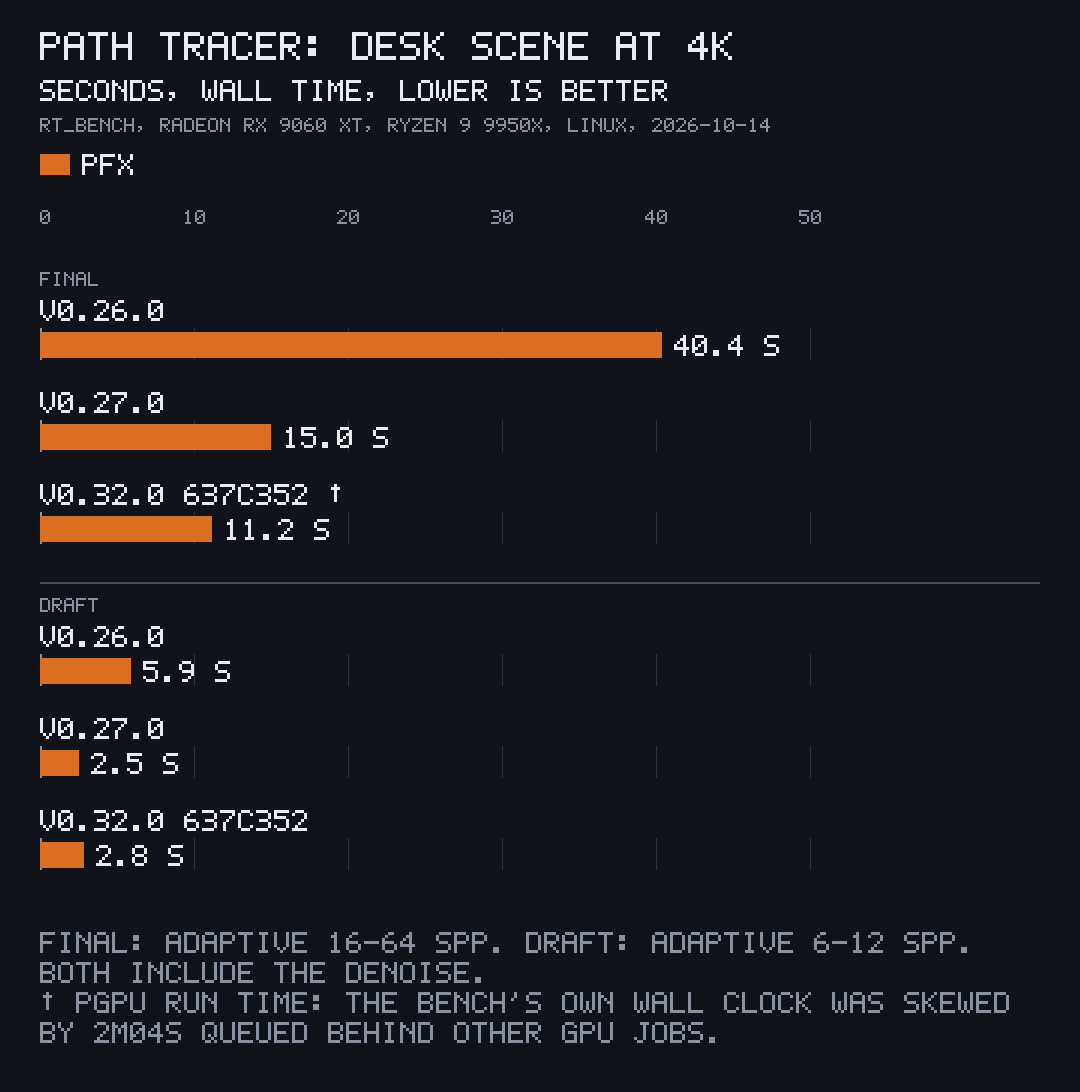
By v0.32.0 the path tracer rendered the 4K desk, denoised, in 11.2 s. At v0.26.0 it took 40.4 s. I didn’t buy a new card. I made it faster.

The denoiser takes a 4K frame clean in 274 ms on the GPU. On the left, 8 samples a pixel, raw and grainy. On the right, after pfx’s denoiser.

128 point and spot lights at 4K: 4.8 s, from 9.4 s light by light. A car-sized model of 159,200 triangles opens in 3.4 ms warm, at half the size of the GLB it came from.
All of it, with how and when it was measured, is on pitomd.com/pfx/speed.
And all that speed means nothing if the thing is fat. pfx is an extremely highly opinionated engine, and the first opinion is this: I didn’t want bloatware. I didn’t want heavy UI and editors and features I barely use, just sitting there, eating disk and memory and my patience.
pfx downloads at 37.5 MB. Installed it’s 84.4 MB. An empty game you ship, with its content, is 33.7 MB. The editor sitting idle uses 0.05% of one CPU thread and 180 MB of memory.
And everything that’s in pfx is there because a real product uses it, every single day. Splicer, Manfred, Inbox0, the films. So nothing in there is half-built and waiting for somebody to care, nothing is abandoned in a corner. It stands on the best open work out there, credited: I find what already does the job best, port it, prove it does exactly the same thing, and then make it faster. The path tracer learned a lot from Cycles, Blender’s renderer, under its licence, with its notice kept. Thank you, Cycles people. No asset store, no marketplace, no account to log into before you open a file.
Then the schedule. I wanted to release fast and to optimise for speed and determinism, on my own schedule. Splicer pins pfx by its exact commit. When Splicer needs something from the engine, I fix it in pfx, move the pin, run the gate and ship. No waiting for somebody else’s next version, no ugly workaround living in my app for a year.
Long renders used to be the thing that stopped me. A crash at frame 300 of 400 and I start over. Not anymore. pfx writes every frame whole, keeps a fingerprint of each one, checkpoints inside a long frame, and before it carries on it renders the last finished frame again to make sure. In its own test a render got killed halfway through frame 2, resumed, and all 8 frames came out the same bytes as a render that never died.
So now I start a long render and I go to sleep.
And the films? A chase is a recipe and a timeline, and one line gives me the vertical clip:
pfx clip chase.pitofx \
  --camera chase --timeline \
  --size 1080x1920
Add --trace and it’s path-traced. Then pfx film cuts the clips and the title cards into one film, with a true-peak ceiling on the sound. I’m cutting a short like that right now, made entirely in pfx.
And yes, I wanted to compare myself with the big giants who are poisoned by corporate agenda. That’s my opinion. Numbers are numbers, so here they are, measured on the same machine:
- Change one value and get a file you can ship: Godot takes 2.34 s. pfx takes 63 ms. Sixty-three.
- The editor’s first frame, warm: Godot 2.18 s, pfx 0.52 s.
- The editor doing nothing: Godot uses 3.2% of the CPU, pfx 0.05%.
- The editor’s memory: Godot 1,064 MB, pfx 180 MB.
- Import a 6.8 MB glTF: Godot 2,479 ms, pfx 46 ms.
- An empty game you ship: Bevy 106.6 MB, Godot 73.5 MB, pfx 33.7 MB.
- Build a game from source: Bevy 180.4 s, pfx 87.4 s. Rebuild after one change: Bevy 1.63 s, pfx 0.96 s.
- The download: Blender 383 MB, the Godot editor 77.9 MB plus 1,281 MB of export templates, pfx 37.5 MB.
Every number, and how it was measured, is on pitomd.com/pfx/speed.
So freaking World, here’s what already runs on pfx:
- Splicer: cut fast. Freaking fast. My extremely highly opinionated video editor. I cut my recordings by what I said, not by scrubbing, and pfx draws its whole desk on the GPU. pitomd.com/splicer.
- Inbox0: your inbox is a bullet hell. My game. Mail falls like bullets, you fire cursors to read it, and Friday’s boss comes for you before the deadline. Built on pfx. pitomd.com/inbox0.


- Manfred: just press 🔴 REC. Never lose a take. My recorder, built on pfx too. pitomd.com/manfred.

Wanna try it? pfx is open source under the AGPL-3.0, free for open source, learning and small studios (the licences).
Download pfx 3.1.3, read the docs at docs.pitomd.com/pfx, or grab the code at github.com/gmrdad82/pfx. If you build something with it, show me. I really wanna see it.
I’m building tools for my dreams. I’m not dreaming for my tools.
I fucking wanted pfx.
Gamer Dad out. Have a good one!
Got questions or doubts? Ping me on Discord
Every pfx picture, clip and chart in this article is pfx's own, from its docs at v3.1.1. The Splicer clips come from its own README and the Inbox0 stills from its own builds.