Guide 01
First boot, first Page.
About two minutes, one folder decision.
Said and Done. arrives whole: the installer carries everything it needs, and nothing is downloaded at boot. Your only real decision is which folder holds your notes.
1 · Install
Run the installer for your platform. On Linux it installs to your own user and adds the launcher entry. On macOS you drag Said and Done. to Applications. On Windows it installs per-user with a normal uninstaller. No elevation, no system folders — and uninstalling never touches your data.
2 · Point it at your notes
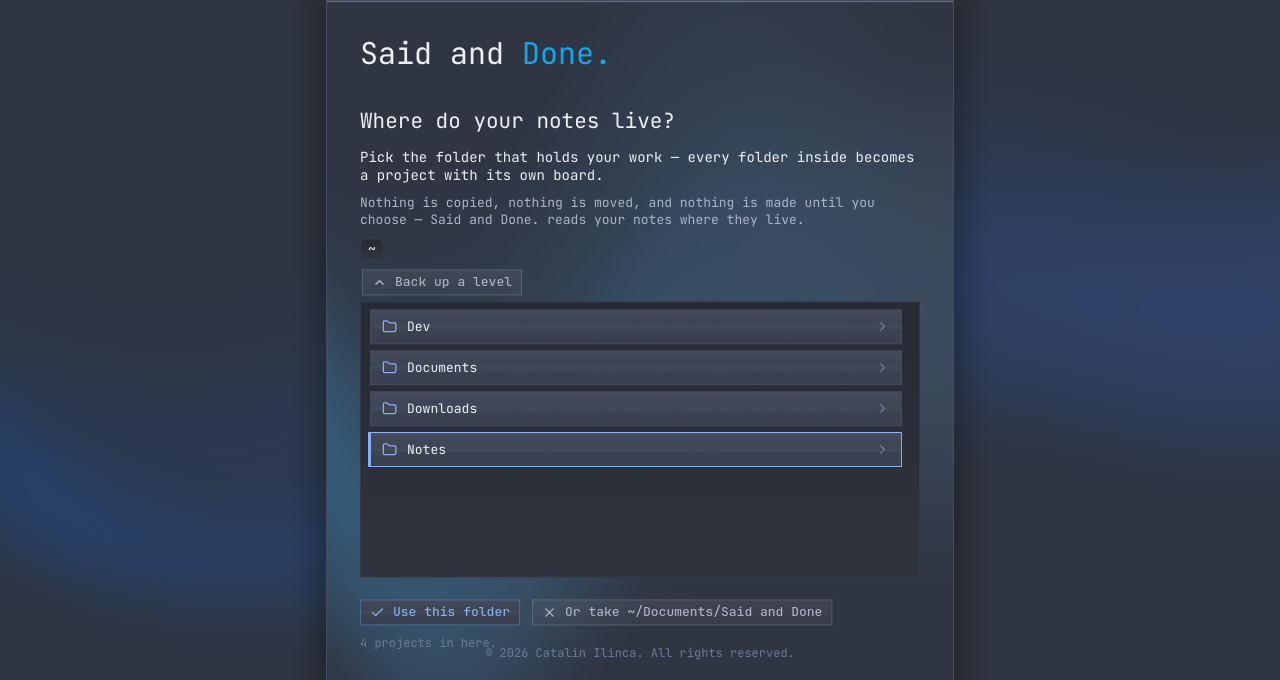
First boot asks one thing first: where do your notes live? Walk to the folder that holds your work and take it. Every folder inside becomes a Notebook; nothing is copied or moved. No notes folder yet? Take the suggested fresh one and grow into it.
3 · Want the expedition?
One last thing: Mars or Bust — a worked example of the desk. Two survivors, a dog, two hundred files of surviving and shipbuilding, and the fifty Pages it takes to fly. Take it aboard and it becomes your selected Notebook, free and never counted against the plan — or start with an empty desk.
4 · The first Page
- Press
n— a new Page opens. - Give it a title in your own words.
- Press
enter— it lands on the record, numbered for life.
That's the whole loop. Say it, work it, and when it's finished — mark it done. Said and Done.